CheckPlus
Increasing the flow of check user transactions through digitization.
My context
Icalia Labs Custom Dev team 2024 | Digital Product designer/ Design Lead | Figma | Ruby on Rails | MPV design and development
The Problems
Checkplus, a payment insurer from northern Mexico, was struggling to grow its service due to a generational issue: they work with physical checks! This made their sales approval process a never-ending nightmare of calls for their sales validation department. If they wanted to expand their client portfolio without their processes collapsing, they needed to go digital. The solution is obvious: a digital platform that would process sales automatically, but the real question to solve was...
Slow expansion due low process capacity
Validation time could went from 30 min to 2 hours on bussy days
How might we transition from traditional process to a digital solution?
The Methodology
Discovery
Understanding Checkplus
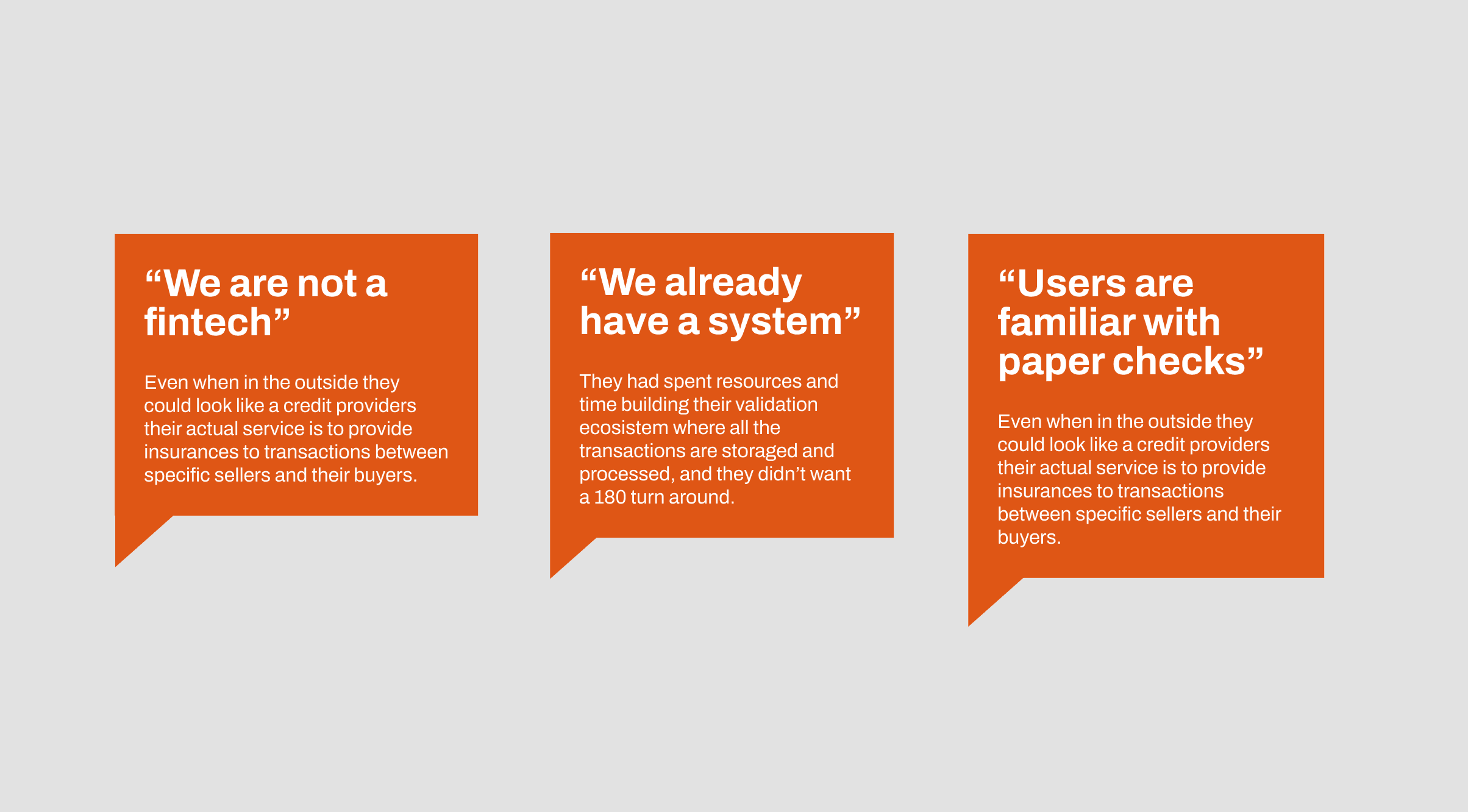
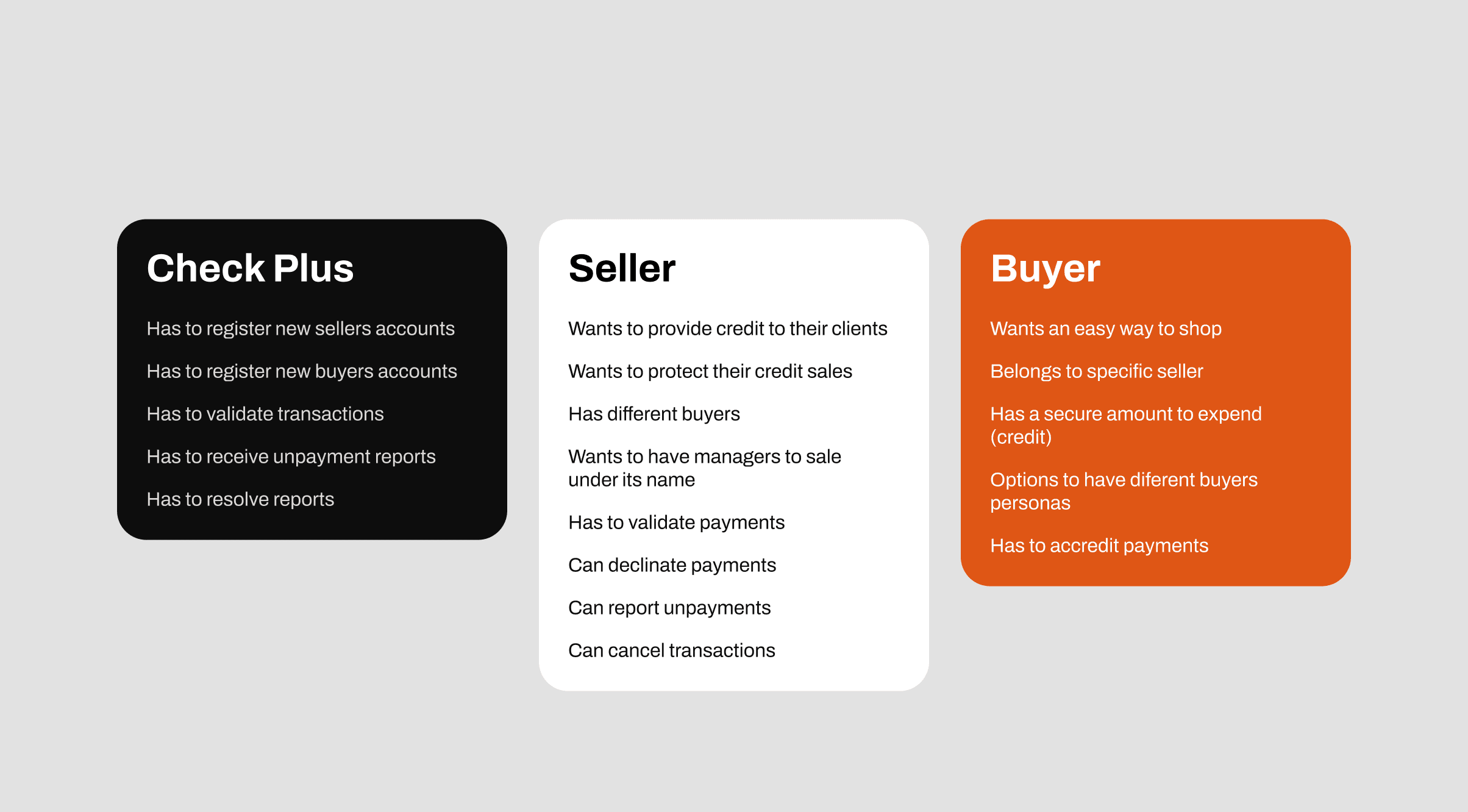
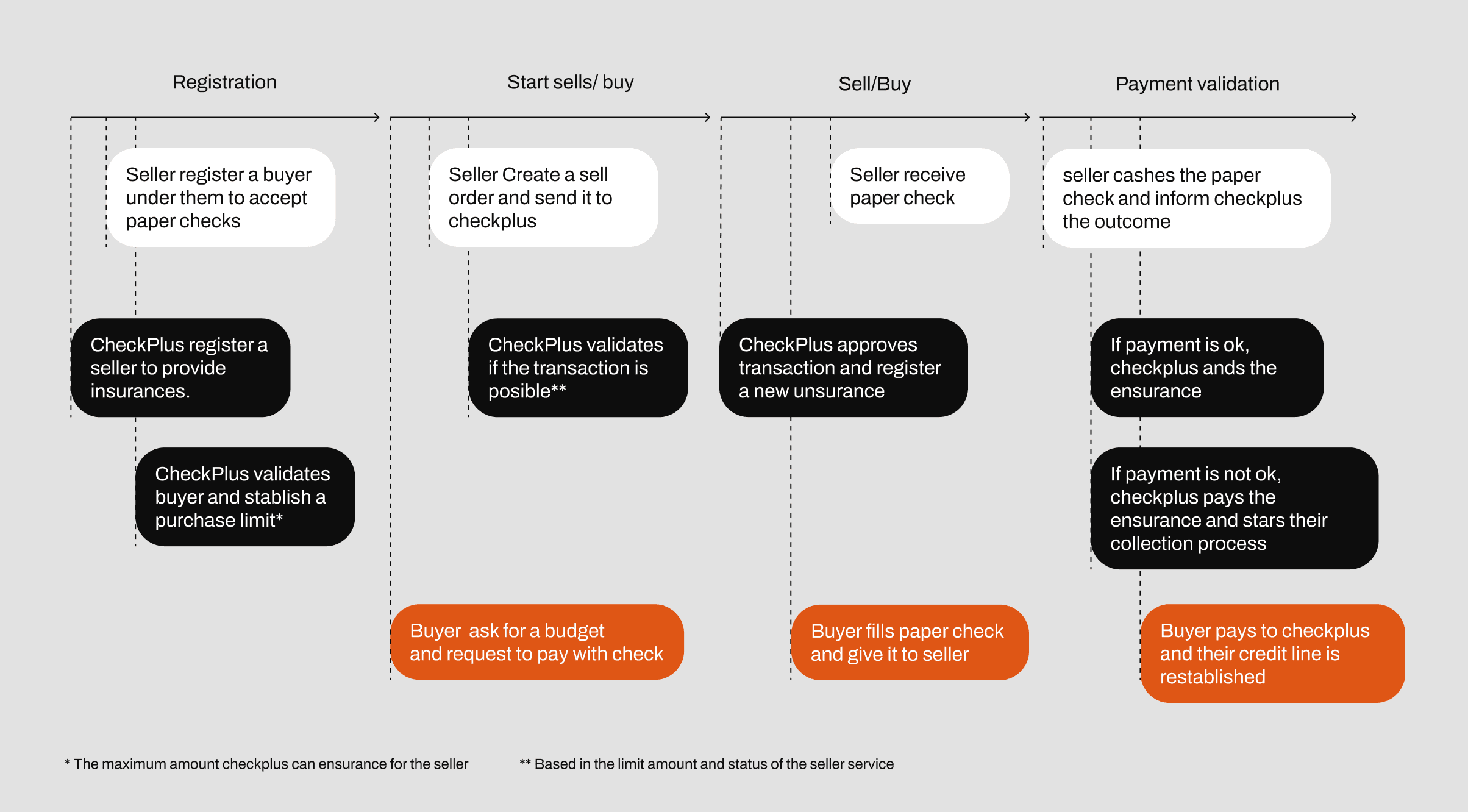
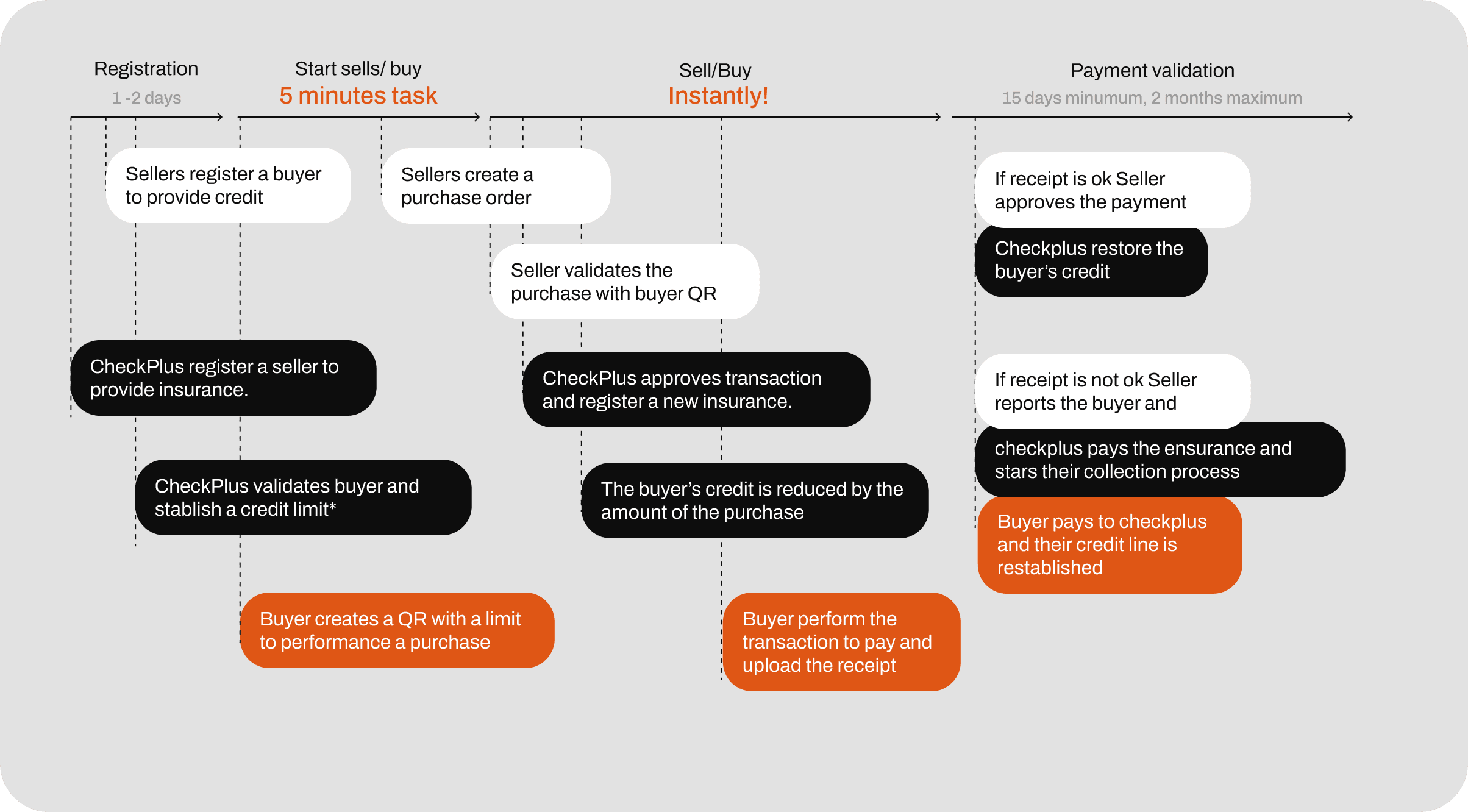
To initiate the service, we conducted 3 discovery sessions aimed at, (if I may be redundant) discovering, how does your service work? Who are the actors in the validation process? How does the validation process function? What is the best-case scenario and the worst-case scenario? During these sessions, we mapped out 2 transaction flows for those that are paid, established the necessary actions for each participant in the service, and gathered the most significant insights for product ideation from the stakeholders.
validating asumptions
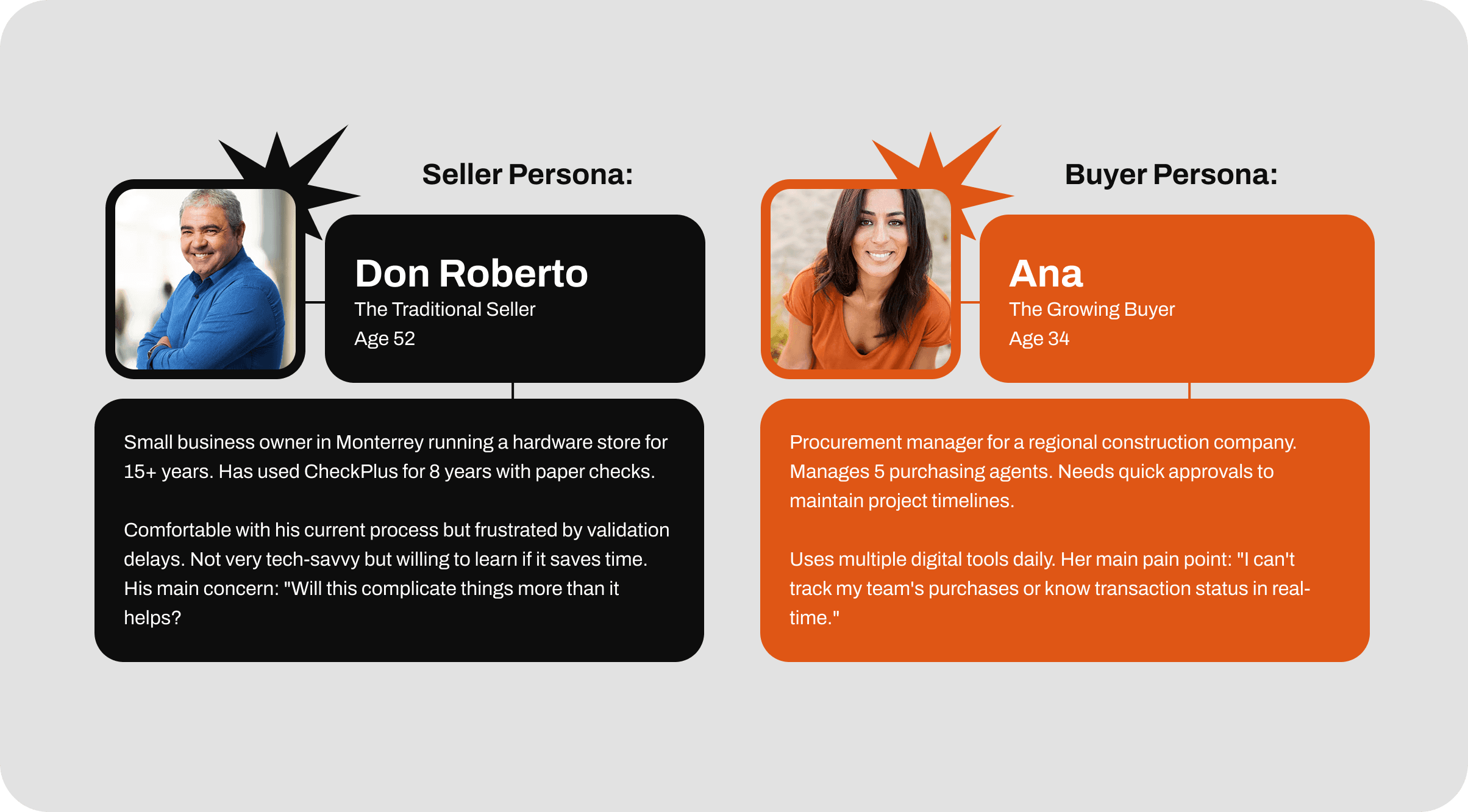
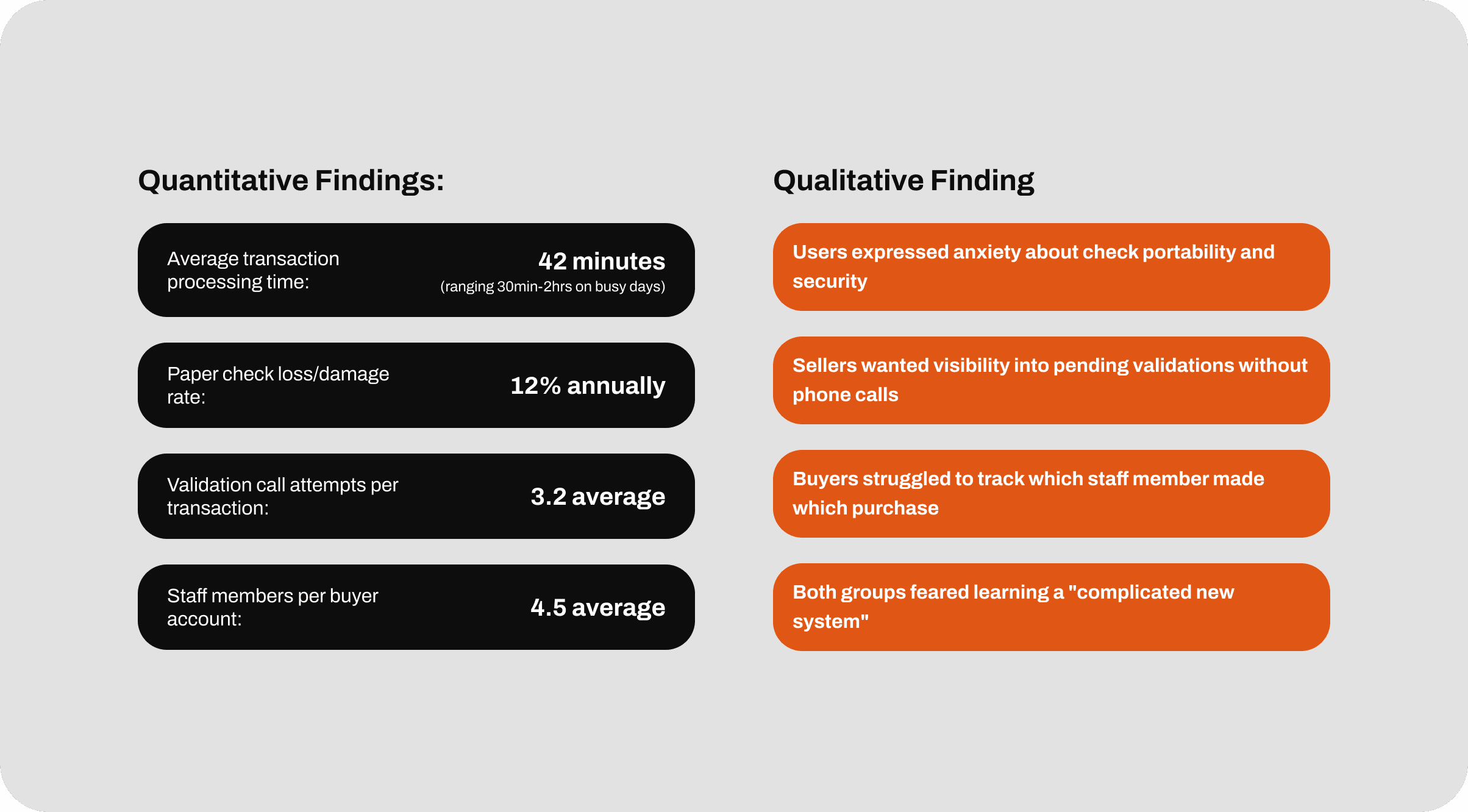
To validate our assumptions and understand real user needs, we conducted research with CheckPlus's existing user base, focusing on two primary user groups. We observed 8 users (4 sellers, 4 buyers) performing actual transactions with paper checks in their work environment, documenting pain points, workarounds, and time spent on each step. with this research we defined our user personas, their user side concerns and a new proposal for the transaction validation method that ends their problems.
Design
Replacing the paper check
During these conversations, we studied different ways to replace the paper check with a digital item. We started with the idea of turning it into a "digital credit with a card" but this created misunderstandings with stakeholders about their service, as they are not a fintech and did not want to be associated with one. This insight cleared up many doubts and options; ultimately, we decided to use a QR code that contained the transaction data as a way to digitize a check.
QR Instead of checks
We transform the process of filling a paper check into activating a QR, this with the objective of keeping the “portability” of the check and provide control to the buyer credit line.
more of this in “MANAGING STAFF”
From 30 minutes validation
To Instantly
We transform the process of filling a paper check into activating a QR, this with the objective of keeping the “portability” of the check and provide control to the buyer credit line.
more of this in “MANAGING STAFF”
Design
Tracking the transactions
Aa mentioned before, Checkplus had a platform where they display transaction statues for their users this display was only informative and users couldn’t do any action on those transactions, like validate payments or report no payments. I design a a new transaction system where users can not only view their transactions but have control over them with out the intervening of CheckPlus.
Displaying transactions
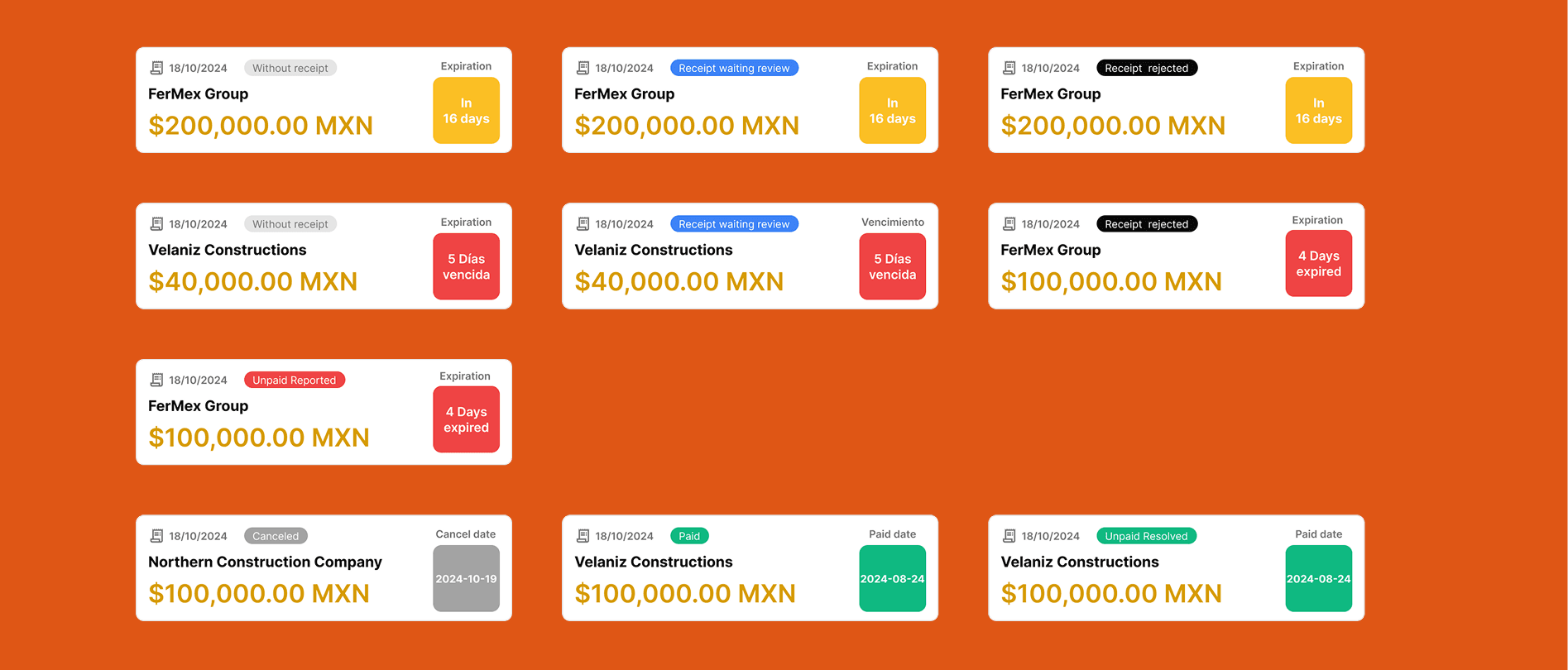
After analyze the service flow we identified all the possible scenarios for a transaction, which was nothing more than 10 possible statues, this was a challenge in terms of information display, i wanted to keep the transaction cards informative but compacted due the amount of transaction a single sealer could have. i identified the most important information from a transaction to be displayed in the preview and categorize them in 4 different types: Expired, Due, Paid and Canceled
Categorizing transactions
I split the transactions into four categories for an easy read and understatement, this division was reinforced with a traffic light systems per transaction status
Options by status
The truth is that from the buyer side the only action they can perform is upload payment receipts for the seller to validate. But from the seller side, they can perform different actions based on transaction status.
Buyer actions:
- Upload payment receipts
- View Payment receipts
- Change payment receipts
Seller actions:
- Cancel sales
- Provide payment extensions.
- View Receipts
- Validate or reject payment receipts
- Report sales
Design
Staff members
A common scenario that came to mind while our discover sessions was that Account owners give paper checks to their employees to perform sales under their names and also the existence of cashiers from the seller side. Over this line it was obvious we have to give both buyers and sellers the feature to have a staff to help them perform purchases and sales. I set 3 state for staff members, "Active", "unactive" and "invited" and 3 main roles, "Owner" the account owner, "Admin" account admin and "Seller or Buyer" the basic role to performance sales or purchases.
Managing Staff
An owner or administrator can manage their employees, view their recent activity, and invite or deactivate them as needed. Additionally, administrators and owners on the buying side can assign purchase codes to other members of their staff.
Implementation
Design System Translation: Staying Tailwind-Native
The development team chose Ruby on Rails for its rapid back-end/front-end integration. Rails is powerful, except, it"s not the most front-end friendly framework. This challenge is typically solved with a CSS framework like Tailwind, which is exactly what we did.
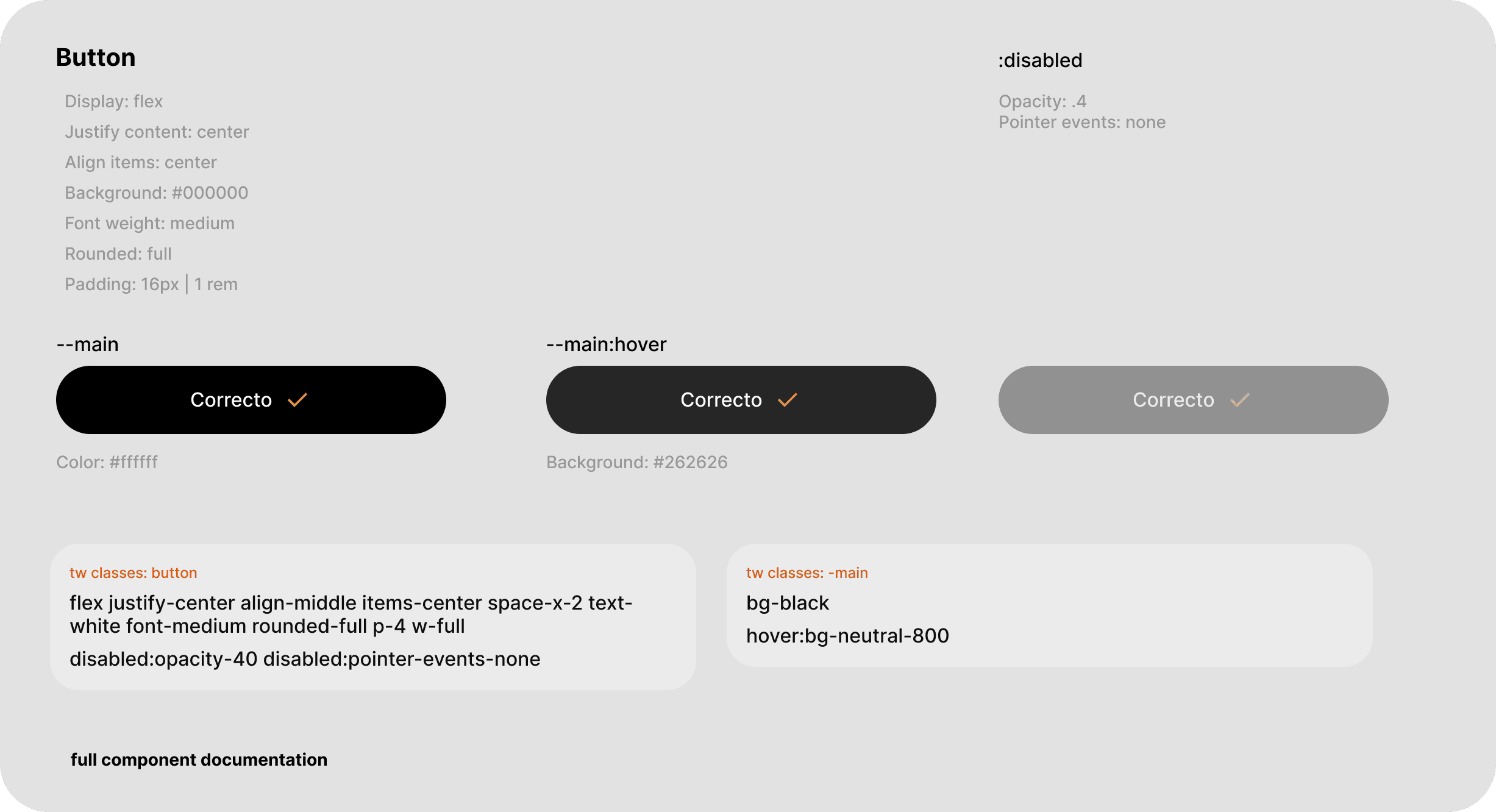
Since the team was already using Tailwind, I took a logic decision: design with Tailwind classes from the start rather than creating a fully custom system that would need translation. In Figma, I documented every component with the actual Tailwind utility classes developers would use, some examples:
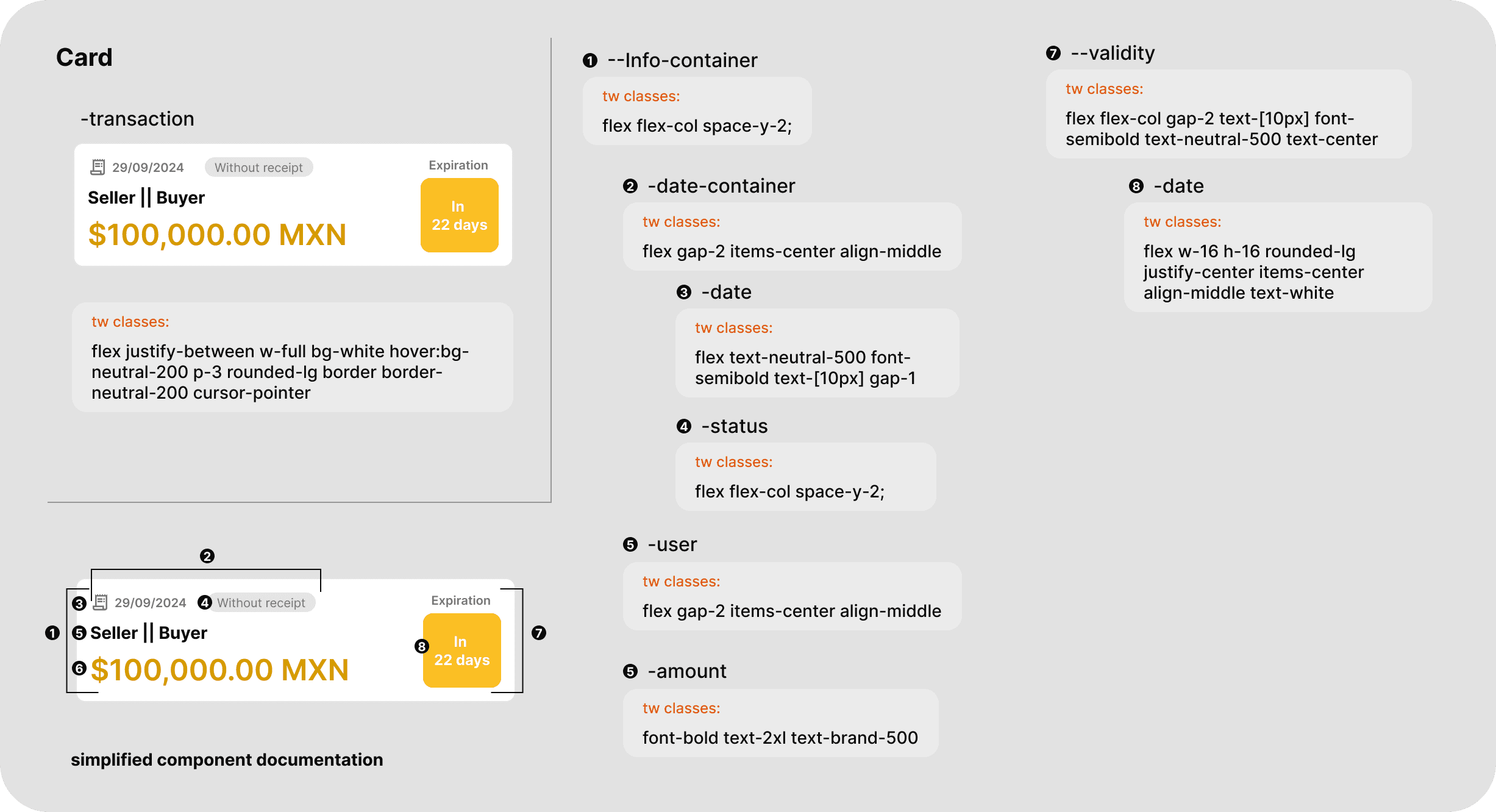
Figma to code
Either way at the moment of setting up the project the team was struggling to connect Checkplus system with the new platform, for that reason i jumped in to help the front implementation translating all the classes components into custom CSS classes keeping tailwind utilities @apply:
Component Variants Without JavaScript
Rails's lack of traditional component variants created a challenge for transaction cards, which needed ~10 different visual states based on status. Writing long chains of if/else statements or switch cases would be messy and hard to maintain.
My solution: leverage CSS attribute selectors with data attributes.The back-end returns the transaction status, and the front-end styling responds automatically based on that data-status value. No JavaScript loops, no complex conditionals—just clean, declarative CSS.
How it works:
The component receives a status from the back-end: using a rails utility:

CSS handles all 10 variants using attribute selectors:
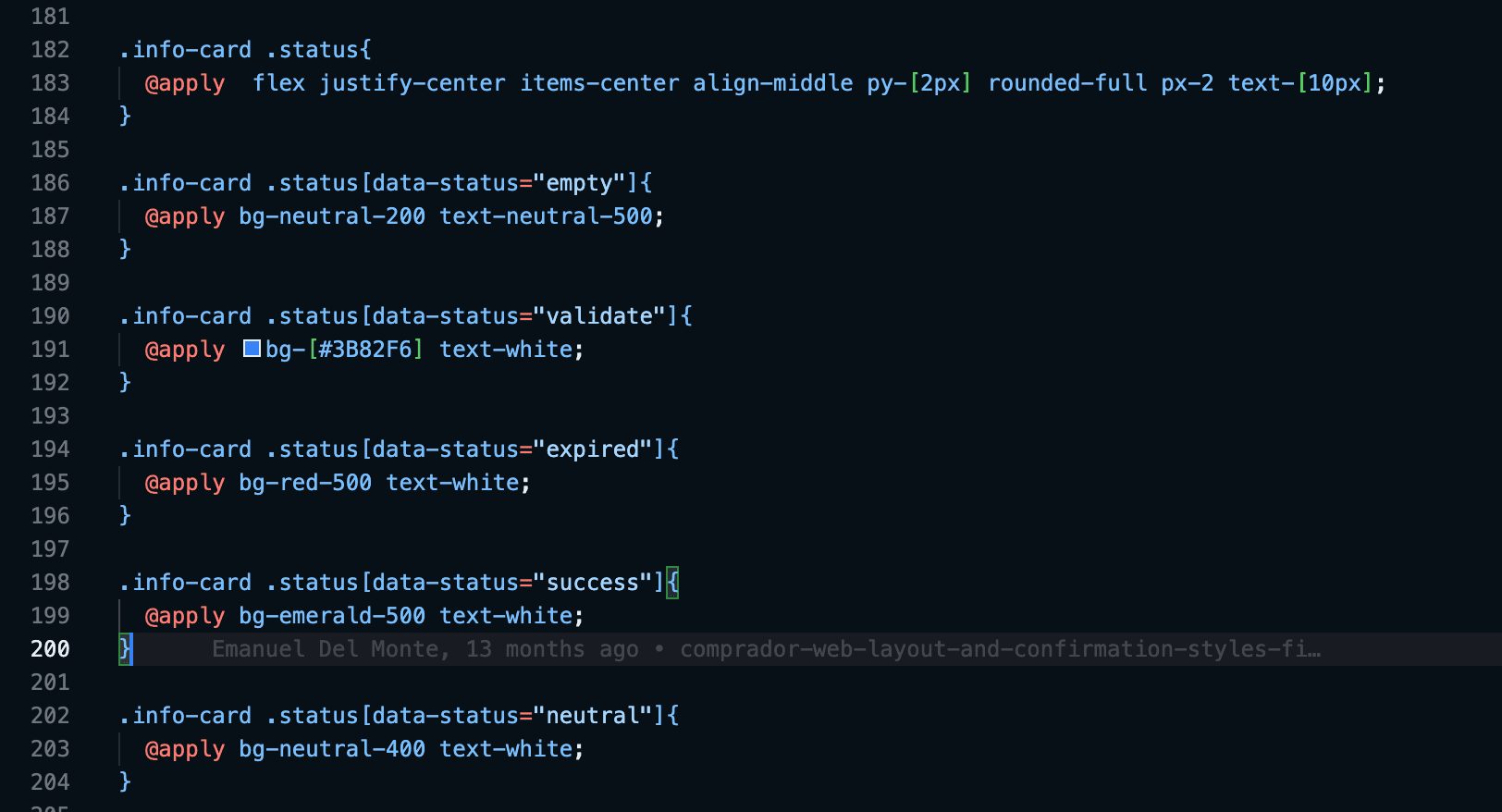
Try it:
expiration
psst: You can inspect the code to view the changes in datavalues
New branch: design/component_fix’
Once I started reviewing the codebase, I discovered a problem: most of the front-end was built inline.
Developers were writing screens line-by-line because Rails doesn't have traditional component architecture like React or Vue.br This approach works initially, but it's neither scalable nor maintainable for future iterations.
For this reason i translated the repetitive code into custom rail partials, so ui elements as transactions cards, user cards and buttons became modular components that could be called with simple parameters.
This work not only made the future sprints easier and faster but also improve the code documentation and performance reducing the lines of code use per screen, as showed below where the integration of UI partials reduced the view code from 180 to 100 lines, almost 50%:
Old code: index.html.erb | 180 lines<div class="flex flex-col space-y-4 section-container lg-adjustment lg:relative" data-controller="ventas--ventas">
  <%= render 'shared/header', title: 'Ventas' %>
  <div class="flex gap-2 items-center  ">
    <!-- Botones de navegación -->
    <div class="grid grid-cols-4  bg-black rounded-full p-1 gap-1 w-full">
      <button
        data-action="click->ventas--ventas#mostrarNuevas click->ventas--ventas#activarBoton"
        class="nav-button text-center py-2 text-xs rounded-full text-white transition-colors ease-in-out duration-300 bg-brand-500"
        >
        Vencidas
      </button>
      <button
        data-action="click->ventas--ventas#mostrarPorVencer click->ventas--ventas#activarBoton"
        class="nav-button text-center py-2 text-xs rounded-full text-white transition-colors ease-in-out duration-300"
        >
        Por vencer
      </button>
      <button
        data-action="click->ventas--ventas#mostrarVencidas click->ventas--ventas#activarBoton"
        class="nav-button text-center py-2 text-xs rounded-full text-white transition-colors ease-in-out duration-300"
        >
        Pagadas
      </button>
      <button
        data-action="click->ventas--ventas#mostrarCanceladas click->ventas--ventas#activarBoton"
        class="nav-button text-center py-2 text-xs rounded-full text-white transition-colors ease-in-out duration-300"
        >
        Canceladas
      </button>
    </div>
    <% if current_user.admin? %>
      <%= link_to reporte_ventas_path(format: :xlsx), class: 'lg-btn-right btn-download' do %>
        <span class="hidden lg:block">Descargar</span>
        <%= image_tag 'xlsx.svg', alt: 'Descargar reporte de ventas', class: 'w-4 h-4' %>
      <% end %>
    <% end %>
  </div>
  <!-- Ventas Vencidas -->
  <section id="nuevas" data-ventas--ventas-target="nuevas" class="ventas-seccion space-y-2 mt-2">
    <% if @ventas_vencidas.any? %>

      <div class='text-sm text-neutral-500 flex flex-row justify-between'>
        <p class='basis-2/3'>Saldo <span class='text-base font-semibold'><%= format_mxn @ventas_vencidas.sum(&:monto) %></span> </p>
        <p class='basis-1/3 text-end'> Transacciones <span class='text-base font-semibold'><%= @ventas_vencidas.length %></span></p>
      </div>
      <% @ventas_vencidas.each do |venta| %>
        <%= link_to venta_path(venta), class: 'transaction-card mb-2 block' do %>
          <div class="info-container">
            <div class="date-container flex justify-between items-center">
              <div class="date flex items-center gap-2">
                <span class="material-symbols-outlined text-sm">receipt_long</span>
                <%= venta.fecha.strftime('%d/%m/%Y') %>
              </div>
              <%= vendedor_venta_estatus_badge(venta) %>
            </div>
            <div class="name mt-2 text-lg"><%= venta.comprador.empresa.name %></div>
            <div class="amount mt-2 font-bold">
              $<%= number_to_currency(venta.monto, unit: 'MXN', precision: 2, format: "%n %u") %>
            </div>
          </div>
          <%= venta_validity(venta) %>
        <% end %>
      <% end %>
    <% else %>
      <div class="flex flex-col items-center justify-center mt-28">
        <p class="text-lg font-bold mb-8">No tienes ventas vencidas</p>
        <span class="material-symbols-outlined text-neutral-950 mb-8" style="font-size: 100px">sentiment_satisfied</span>
        <p class="text-sm text-center px-10">
          Cuando alguna transacción <span class="font-bold text-brand-500">supere el plazo de pago establecido</span> aparecerá
          en esta pantalla dónde podrás realizar los <span class="font-bold text-brand-500">reportes correspondientes</span>
        </p>
      </div>

    <% end %>
  </section>
  <!-- Ventas Por Vencer -->
  <section id="por_vencer" data-ventas--ventas-target="por_vencer" class="ventas-seccion space-y-2 mt-2 hidden">
    <% if @ventas_por_vencer.any? %>

      <div class='text-sm text-neutral-500 flex flex-row justify-between'>
        <p class='basis-2/3'>Saldo <span class='text-base font-semibold'><%= format_mxn @ventas_por_vencer.sum(&:monto) %></span> </p>
        <p class='basis-1/3 text-end'> Transacciones <span class='text-base font-semibold'><%= @ventas_por_vencer.length %></span></p>
      </div>
      <% @ventas_por_vencer.each do |venta| %>
        <%= link_to venta_path(venta), class: 'transaction-card mb-2 block' do %>
          <div class="info-container">
            <div class="date-container">
              <div class="date">
                <span class="material-symbols-outlined" style="font-size:14px">receipt_long</span>
                <%= venta.fecha.strftime('%d/%m/%Y') %>
              </div>
              <%= vendedor_venta_estatus_badge(venta) %>
            </div>
            <div class="name"><%= venta.comprador.empresa.name %></div>
            <div class="amount">
              $<%= number_to_currency(venta.monto, unit: 'MXN', precision: 2, format: "%n %u") %>
            </div>
          </div>
          <%= venta_validity(venta) %>
        <% end %>
      <% end %>
    <% else %>
      <div class="flex flex-col items-center justify-center mt-28">
        <p class="text-lg font-bold mb-8">No tienes ventas activas</p>
        <span class="material-symbols-outlined text-neutral-950 mb-8" style="font-size: 100px">shopping_bag</span>
        <p class="text-sm text-center px-10">
          <span class="font-bold text-brand-500">Invita a tus compradores a comprar con CheckPlus</span> y haz crecer tus ventas de una forma más fácil y segura
        </p>
      </div>

    <% end %>
  </section>
  <!-- Ventas Canceladas -->
  <section id="cancelada" data-ventas--ventas-target="canceladas" class="ventas-seccion space-y-2 mt-2 hidden">
    <% if @ventas_canceladas.any? %>

      <div class='text-sm text-neutral-500 flex flex-row justify-between'>
        <p class='basis-2/3'>Saldo <span class='text-base font-semibold'><%= format_mxn @ventas_canceladas.sum(&:monto) %></span> </p>
        <p class='basis-1/3 text-end'> Transacciones <span class='text-base font-semibold'><%= @ventas_canceladas.length %></span></p>
      </div>
      <% @ventas_canceladas.each do |venta| %>
        <%= link_to venta_path(venta), class: 'transaction-card mb-2' do %>
          <div class="info-container">
            <div class="date-container">
              <div class="date">
                <span class="material-symbols-outlined" style="font-size:14px">receipt_long</span>
                <%= venta.fecha.strftime('%d/%m/%Y') %>
              </div>
              <%= vendedor_venta_estatus_badge(venta) %>
            </div>
            <div class="name"><%= venta.comprador.empresa.name %></div>
            <div class="amount">
              $<%= number_to_currency(venta.monto, unit: 'MXN', precision: 2, format: "%n %u") %>
            </div>
          </div>
          <%= venta_validity(venta) %>
        <% end %>
      <% end %>
    <% else %>
      <div class="flex flex-col items-center justify-center mt-28">
        <p class="text-lg font-bold mb-8">No tienes ventas canceladas</p>
        <span class="material-symbols-outlined text-neutral-950 mb-8" style="font-size: 100px">sentiment_satisfied</span>
        <p class="text-sm text-center px-10">
          Recuerda que puedes <span class="font-bold text-brand-500">cancelar</span> una compra <span class="font-bold text-brand-500">hasta 24 hrs después de la misma</span> en caso de ser necesario
        </p>
      </div>

    <% end %>
  </section>
  <!-- Ventas Vencidas -->
  <section id="vencidas" data-ventas--ventas-target="vencidas" class="ventas-seccion space-y-2 mt-2 hidden ">
    <% if @ventas_pagadas.any? %>

      <div class='text-sm text-neutral-500 flex flex-row justify-between'>
        <p class='basis-2/3'>Saldo <span class='text-base font-semibold'><%= format_mxn @ventas_pagadas.sum(&:monto) %></span> </p>
        <p class='basis-1/3 text-end'> Transacciones <span class='text-base font-semibold'><%= @ventas_pagadas.length %></span></p>
      </div>
      <% @ventas_pagadas.each do |venta| %>
        <%= link_to venta_path(venta), class: 'transaction-card mb-2' do %>
          <div class="info-container">
            <div class="date-container">
              <div class="date">
                <span class="material-symbols-outlined" style="font-size:14px">receipt_long</span>
                <%= venta.fecha.strftime('%d/%m/%Y') %>
              </div>
              <%= vendedor_venta_estatus_badge(venta) %>
            </div>
            <div class="name"><%= venta.comprador.empresa.name %></div>
            <div class="amount">
              $<%= number_to_currency(venta.monto, unit: 'MXN', precision: 2, format: "%n %u") %>
            </div>
          </div>
          <%= venta_validity(venta) %>
        <% end %>
      <% end %>
    <% else %>
      <div class="flex flex-col items-center justify-center mt-28">
        <p class="text-lg font-bold mb-8">No tienes ventas pagadas</p>
        <span class="material-symbols-outlined text-neutral-950 mb-8" style="font-size: 100px">priority</span>
        <p class="text-sm text-center px-10">
          <span class="font-bold text-brand-500">Invita a tus compradores a comprar con CheckPlus</span> y haz crecer tus ventas de una forma más fácil y segura
        </p>
      </div>

    <% end %>
  </section>
</div>
New code: index.html.erb | 100 lines<section class="flex flex-col space-y-4 section-container lg-adjustment lg:relative h-auto" data-controller="ventas--ventas"> <%= render 'shared/header', title: 'Compras' %> <div class="flex gap-2 items-center"> <!-- Botones de navegación --> <div class="grid grid-cols-4 bg-black rounded-full p-1 space-x-1 w-full"> <button data-action="click->ventas--ventas#mostrarNuevas click->ventas--ventas#activarBoton" class="nav-button py-2 text-xs rounded-full text-white transition-colors ease-in-out duration-300 bg-brand-500" > Vencidas </button> <button data-action="click->ventas--ventas#mostrarPorVencer click->ventas--ventas#activarBoton" class="nav-button py-2 text-xs rounded-full text-white transition-colors ease-in-out duration-300" > Por vencer </button> <button data-action="click->ventas--ventas#mostrarVencidas click->ventas--ventas#activarBoton" class="nav-button py-2 text-xs rounded-full text-white transition-colors ease-in-out duration-300" > Pagadas </button> <button data-action="click->ventas--ventas#mostrarCanceladas click->ventas--ventas#activarBoton" class="nav-button py-2 text-xs rounded-full text-white transition-colors ease-in-out duration-300" > Canceladas </button> </div> <% if current_user.admin? %> <%= link_to reporte_compras_path(format: :xlsx), class: 'btn-download lg-btn-right' do %> <span class="hidden lg:block">Descargar</span> <%= image_tag 'xlsx.svg', alt: 'Descargar reporte de ventas', class: 'w-4 h-4' %> <% end %> <% end %> </div> <div> <!-- Ventas Vencidas --> <section id="nuevas" data-ventas--ventas-target="nuevas" class="ventas-seccion space-y-2 mt-2"> <% if @compras_vencidas.any? %> <%= render "shared/transaction_balance", transactions: @compras_vencidas %> <% @compras_vencidas.each do |venta| %> <%= render 'shared/compra', compra: venta %> <% end %> <% else %> <%= render 'shared/empty_transactions', message: 'No tienes compras vencidas', icon:'sentiment_satisfied', description: 'Recuerda <span class="font-bold text-brand-500">pagar tus compras antes de las fechas límite</span> para generar un buen historial en <span class="font-bold text-brand-500">CheckPlus</span>' %> <% end %> </section> <!-- Ventas Por Vencer --> <section id="por_vencer" data-ventas--ventas-target="por_vencer" class="ventas-seccion space-y-2 mt-2 hidden"> <% if @compras_por_vencer.any? %> <%= render "shared/transaction_balance", transactions: @compras_por_vencer %> <% @compras_por_vencer.each do |venta| %> <%= render 'shared/compra', compra: venta %> <% end %> <% else %> <%= render 'shared/empty_transactions', message: 'No tienes compras activas', icon:'calendar_clock', description: 'Realiza una compra para empezar a usar tu crédito <span class="font-bold text-brand-500">CheckPlus</span>' %> <% end %> </section> <!-- Ventas Canceladas --> <section id="cancelada" data-ventas--ventas-target="canceladas" class="ventas-seccion space-y-2 mt-2 hidden"> <% if @compras_canceladas.any? %> <%= render "shared/transaction_balance", transactions: @compras_canceladas %> <% @compras_canceladas.each do |venta| %> <%= render 'shared/compra', compra: venta %> <% end %> <% else %> <%= render 'shared/empty_transactions', message: 'No tienes compras canceladas', icon:'sentiment_satisfied', description: 'Recuerda que puedes <span class="font-bold text-brand-500">cancelar</span> una compra <span class="font-bold text-brand-500">hasta 24 hrs después de la misma</span> en caso de ser necesario, poniéndote en contacto con tu vendedor' %> <% end %> </section> <!-- Ventas Pagadas --> <section id="vencidas" data-ventas--ventas-target="vencidas" class="ventas-seccion space-y-2 mt-2 hidden"> <% if @compras_pagadas.any? %> <%= render "shared/transaction_balance", transactions: @compras_pagadas %> <% @compras_pagadas.each do |venta| %> <%= render 'shared/compra', compra: venta %> <% end %> <% else %> <%= render 'shared/empty_transactions', message: 'No tienes compras pagadas', icon:'priority', description: 'Recuerda <span class="font-bold text-brand-500">pagar tus compras antes de las fechas límite</span> para generar un buen historial en <span class="font-bold text-brand-500">CheckPlus</span>' %> <% end %> </section> </div> </section>
Validation
Adjusting designs decisions
Throughout the design, planing and development phases were moments that make me do minimal changes for the good of the overall process
One platform, two experiences
Due this was a web platform and not an mobile app, we packed everything in one platform where base on your user you get to one experience or another, i also make sure they look clear different using brand colors to avoid experience mistakes not just for the users but developers know what path they were working on.
Devices without Camera?
A key moment in the final stages of development was a conversation we had regarding sub-users and portability, where we noted that some collectors are "static" Our initial proposal was for a highly portable platform that could primarily be accessed on mobile devices; however, we made adaptations to ensure it could also be accessible from a computer that does not have a camera to scan codes, starting with the addition of a numeric code alongside the QR code as another method of validation.
Launch
Adopting a new payment method
After the launch of the platform, we held conversations with 15 former users of the CheckPlus service and 5 users who were just starting with the service to gather their impressions on the new format of the service and measure against our success metrics.
The platform successfully met our primary technical benchmarks. Transaction processing time dropped from an average of 42 minutes to under 5 minutes, exceeding our goal. The validation department reported a 68% reduction in incoming calls, nearly hitting our 70% target. However, user adoption and task completion revealed a more nuanced picture.
72%
of historical users felt enthusiastic about the new platform
83%
of new users showed interest in the renewed service
90%
Task completation on main task
QR Creation and purchase completation
65%
Task completation on secondary tasks
Upload receipt, validate and report buyers..
The data told a clear story: users valued the digital transformation and found core functions intuitive, but the complexity of edge-case workflows needed better guidance. This was especially true for traditional users making the transition from familiar paper-based processes to digital-first interactions.
transition helpers
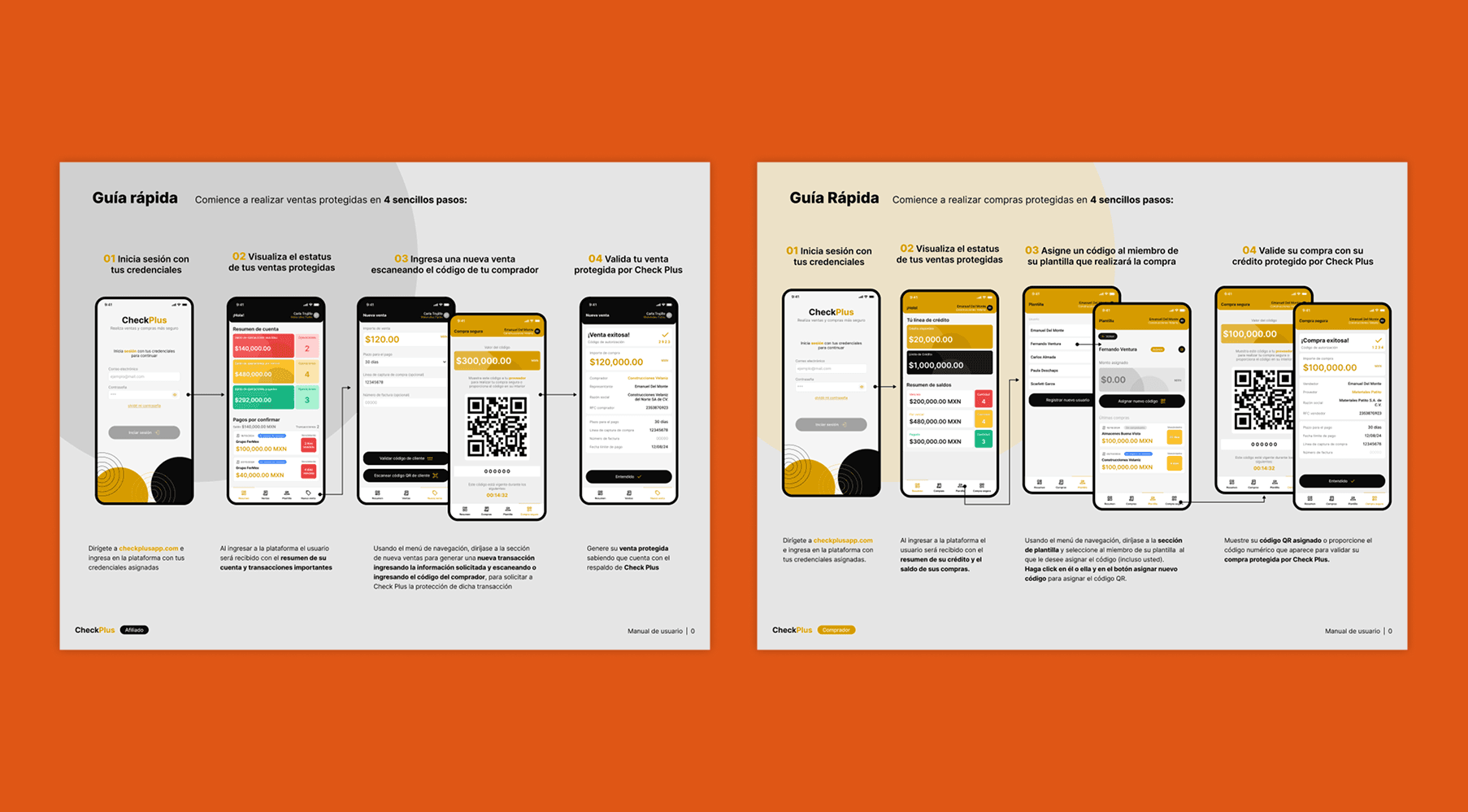
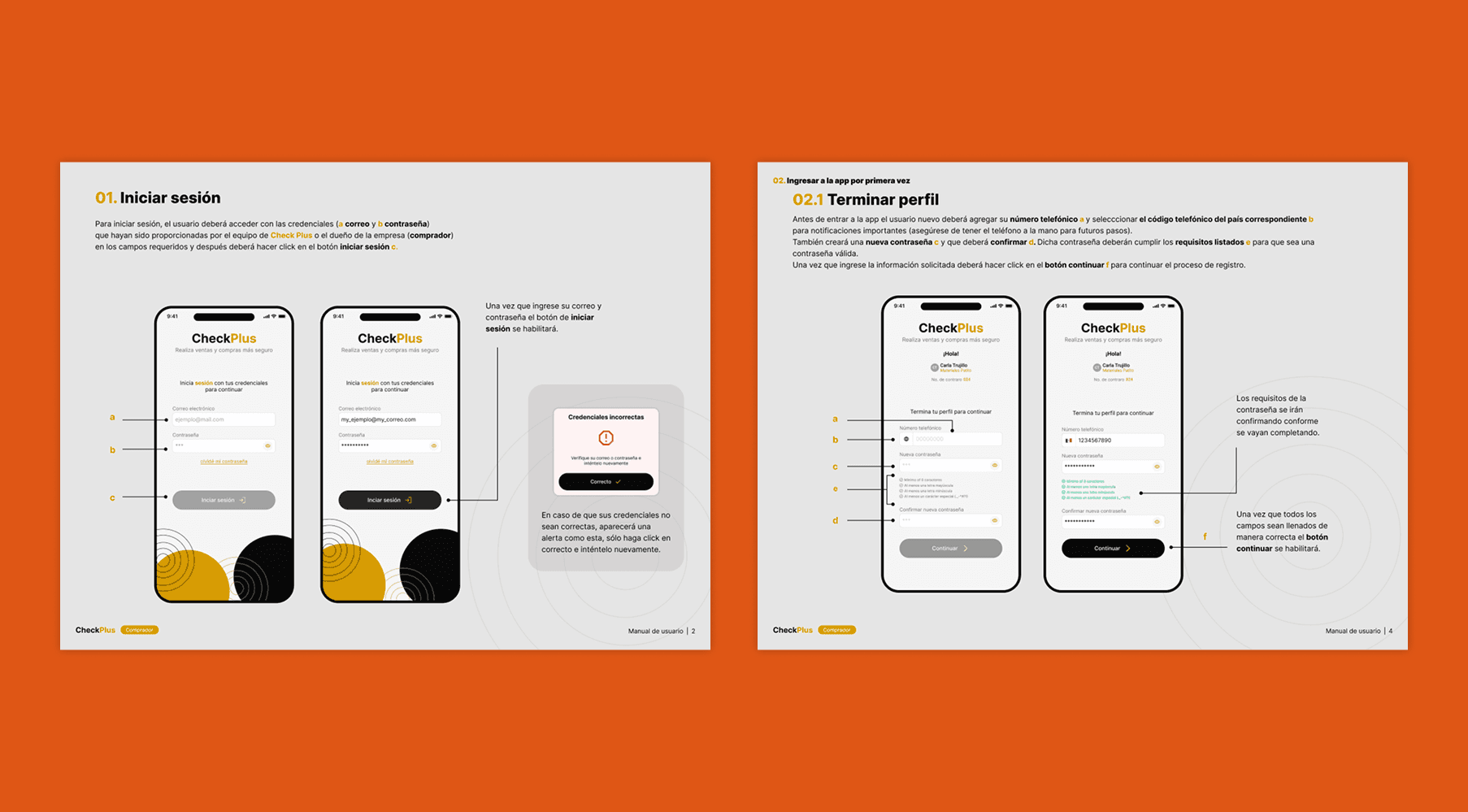
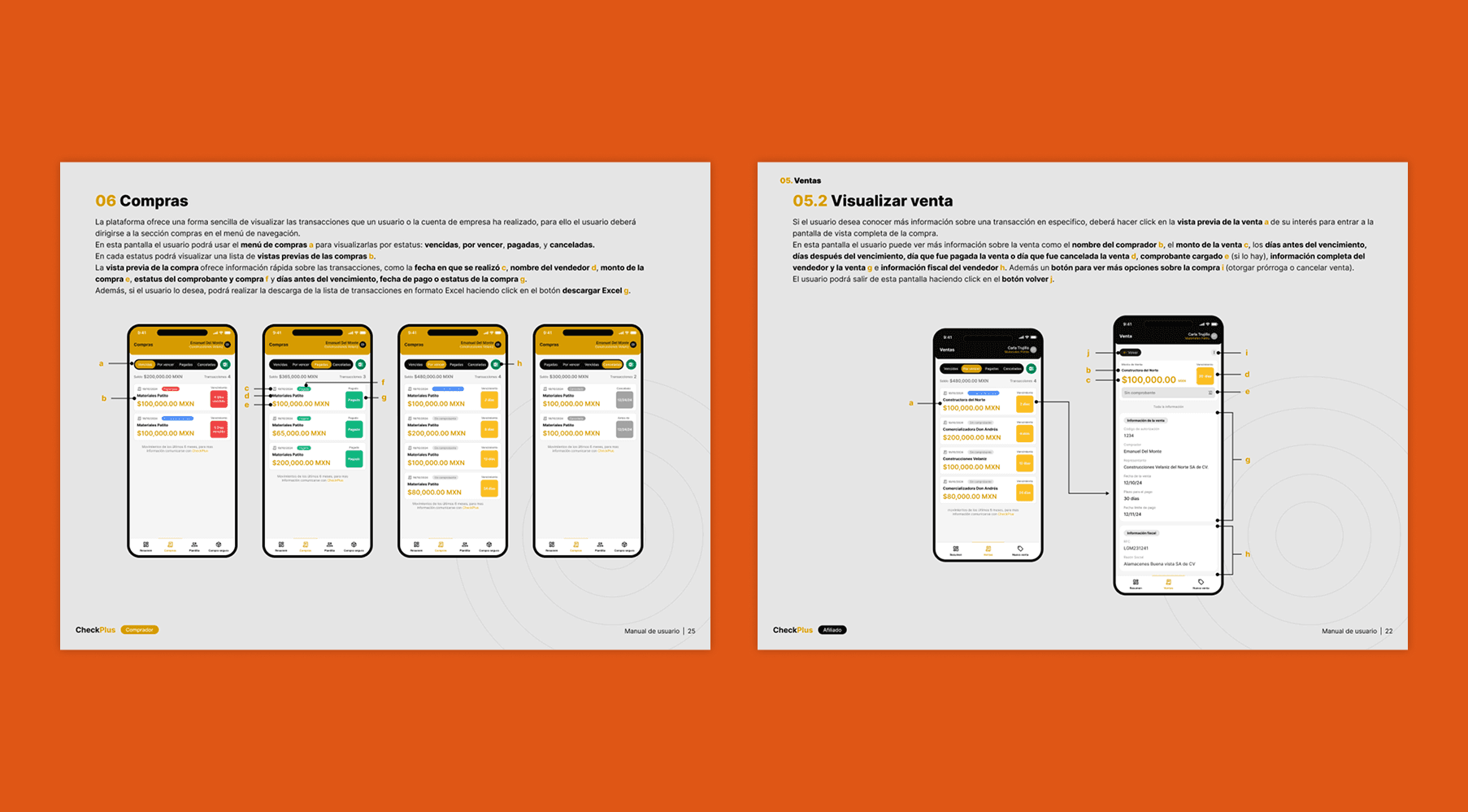
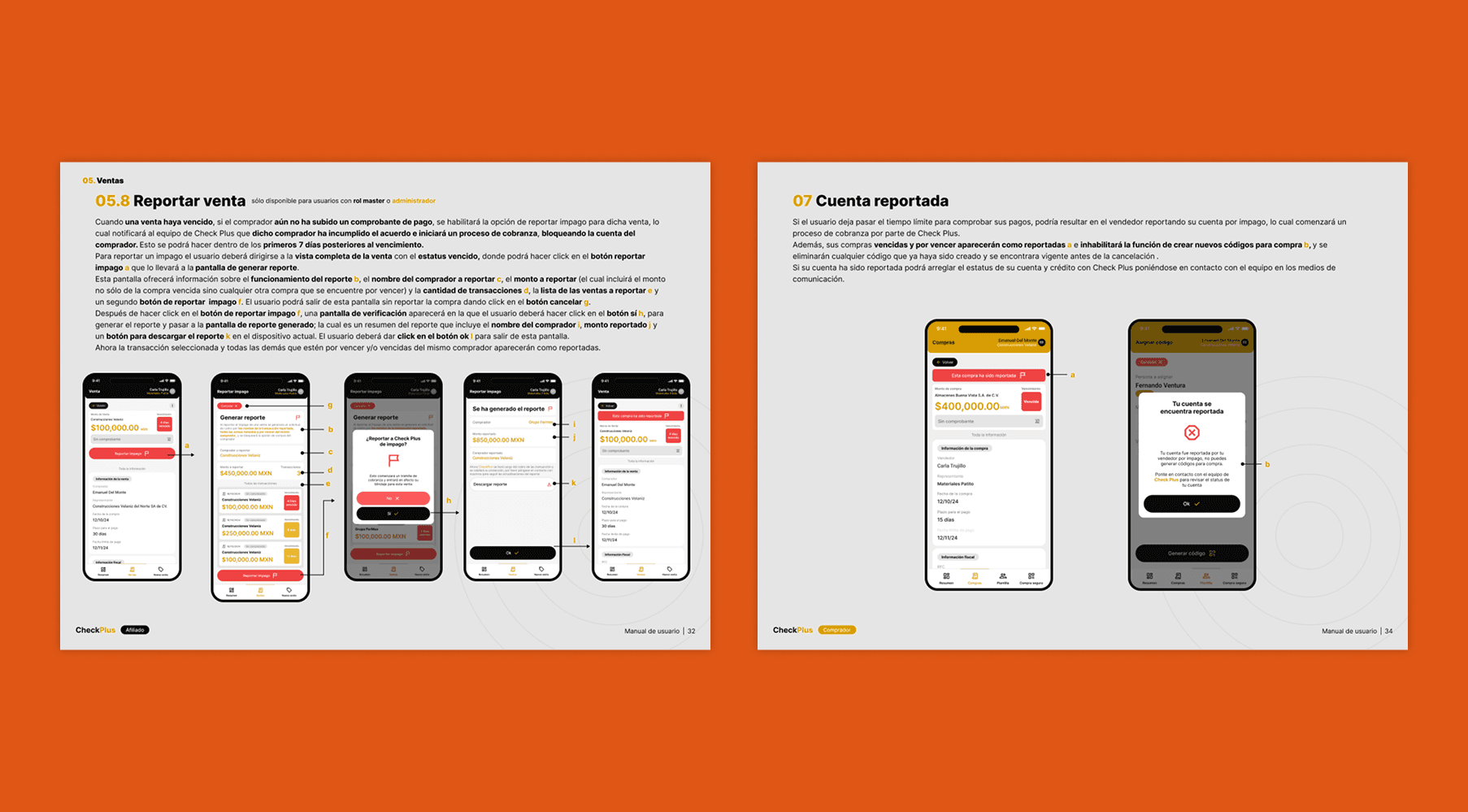
Despite having received good validation from the interviewees, we decided to take their recommendations to implement actions on our side that could facilitate a better transition from the old service to the new one. Since we no longer had time for development, our efforts were focused on creating "physical" materials by producing and delivering two digital user manuals, one forThe buyer and the other for The seller (both in spanish).
Recap and learns
What would i do different
There is obviously a significant burden when developing an application solely based on stakeholders as the only reference for how the application should be. This is something very common that I regularly have to deal with due to the nature of MVPs; budgets are not very high and are completely focused on development. Without a doubt, if I were to go through this situation again, I would try to conduct additional validations with users of the platform during the design phase, not just at the end of the MVP.
Even though my entire focus was on transforming a conventional process into a digital one, I dedicated little time to onboarding within the application. This was later attempted to be addressed with a manual due to development time and costs; however, the idea of having everything within the platform without the need to leave it is the ideal for any application. This has helped me think more carefully about how to communicate the use of a new tool to a new user in future projects.
What did i learn?
Due to the development time and the complexity it posed for the developers to adapt to the system they already had, the project was delayed a bit. This prompted me to raise my hand and offer to help with the front-end layout, which allowed me to improve my technical skills with Ruby on Rails, gaining a better understanding of how to use action views and active records in Rails. Additionally, I learned how to enhance the delivery of designs and components specifically tailored for this language, improving my compositions to work better with Rails layouts and partials.