Valmex
Updating a past decade experience with modern UX patterns
My context
Icalia Labs Custom Dev team 2024 | UX Designer | UX Design Workshop Assistant | User Flow Mapping | Prototype | Figma
Timeline
This entire redesign —from problem analysis to validated prototype— happened in 2 weeks (10 working days). This reduced timeline defined our approach: what we prioritized, what we skip, and how we validated. This is what happens when you need to transform a legacy platform fast, with real constraints and actual stakeholders.
The Problems
Valmex SI is the platform offered by Valmex, a pension fund administrator where users associated with private companies can track and record their financial transactions, as well as save or request loans and withdrawals. However, this platform has been far from accessible for users. Complex and unintuitive flows, incomprehensible menus, and a poor overall experience have brought Valmex to a point where even its employees (who also manage their funds and investments there) dislike or do not know how to use it. As a result, its customer service is constantly overwhelmed with requests ranging from changing investment percentages of the funds to simply obtaining a list of their financial transactions.
Low user adoptation due a poor UX
Cuostumer services in a users request hell
The Workshop
Under the previous understanding, Valmex sought us out as UX specialists to design a new platform that would address their issues by integrating a better user experience and laying the groundwork for an improved visual system that could be expanded by their team in the future. This was developed over a span of 2 weeks of intense work using the Design Sprint methodology, where, session by session, requirements and "nice to haves" were distilled through the analysis of the platform and discussions with stakeholders into flow maps and requirements, followed by the development of a proposal and visual prototype that was validated with the same stakeholders.
The Methodology
The Methodology
The participants
Amilcar
Deputy Director of Individualization Services
Product guru and decision maker- Provides crucial insights and helps the team resolve conflicts
Nat & Fabi
Deputy Director of Institutional Linkage & Deputy Director of Marketing
Marketing expert- Provides essential audience insights and marketing efforts
Irving
Deputy Director of CRM
User expert- Provides vital information about user and customer service experiences
Sonia M.
Design lead
workshop facilitator- Make sure the workshop happens, and to provide the framework so everyone else can succeed
Me
Product designer, workshop assistant
UX Design and Prototype- Turn insights and concerns into a reality, make it look god applying best UX practices and enhance the experience
The challenge
How might we transform user pain points into an improved experience that minimizes support dependency within a 2-week sprint?
10 days to transform a 40-year-old platform
We had 10 working days to redesign a platform serving thousands of users across dozens of companies. This timeline forced us to make strategic trade-offs that maximized impact within realistic constraints.
Stakeholder validation over user testing
Daily validation with decision-makers ensured technical feasibility and business alignment. Sure, we couldn't test with actual end users, but we had something equally valuable: Irving from CRM, who literally talks to frustrated users all day
Core pain points over edge cases
We focused on the 5 highest-impact flows generating the most support calls, rather than trying to redesign everything.
Scalable foundations over comprehensive docs
Delivered 10+ reusable components with essential guidelines—enough for Valmex's team to expand independently.
Speed over polish
Functional clarity over pixel perfection. Good enough to validate and build in time without looking like a simple blueprint
Analyze
We start by classifying the problems
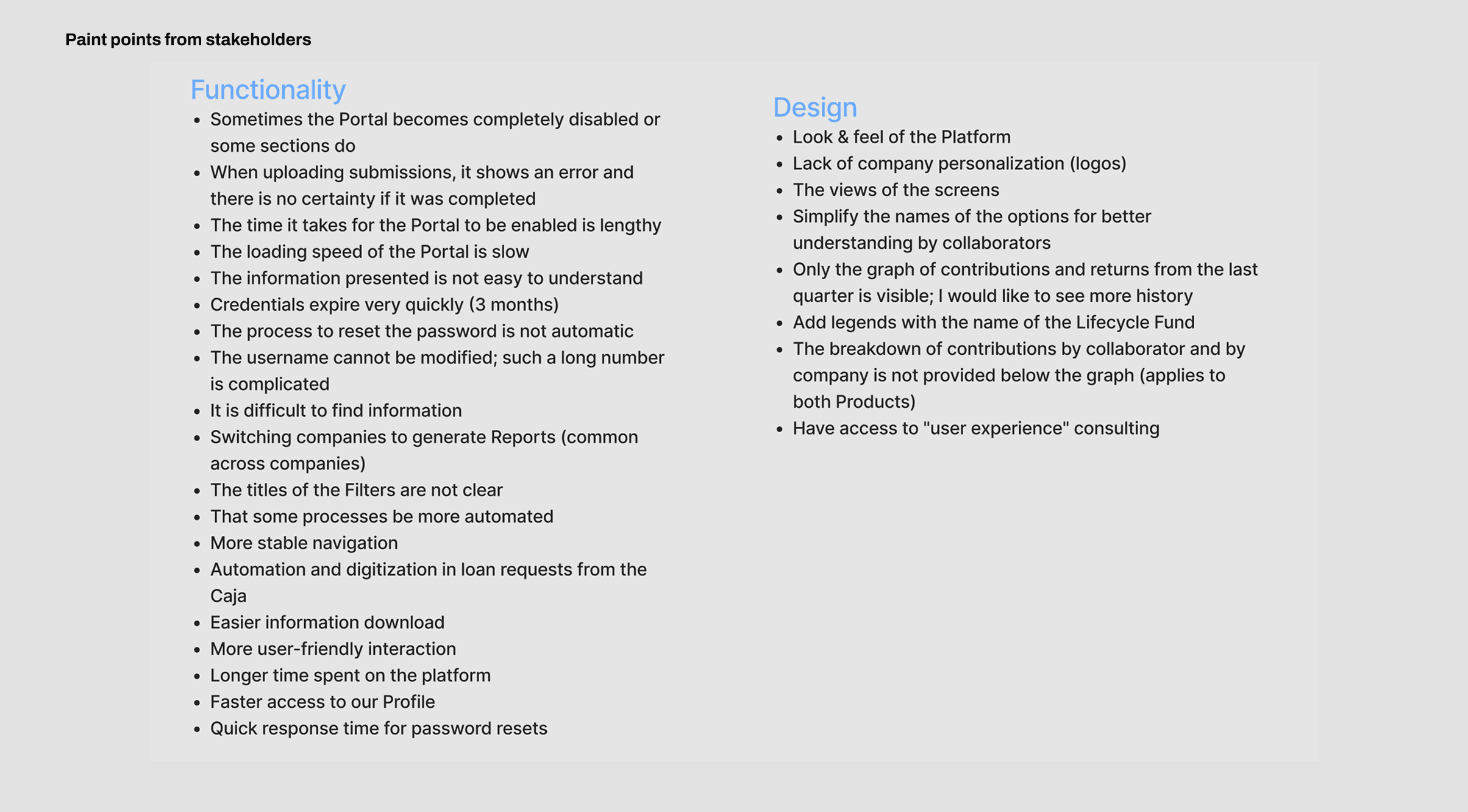
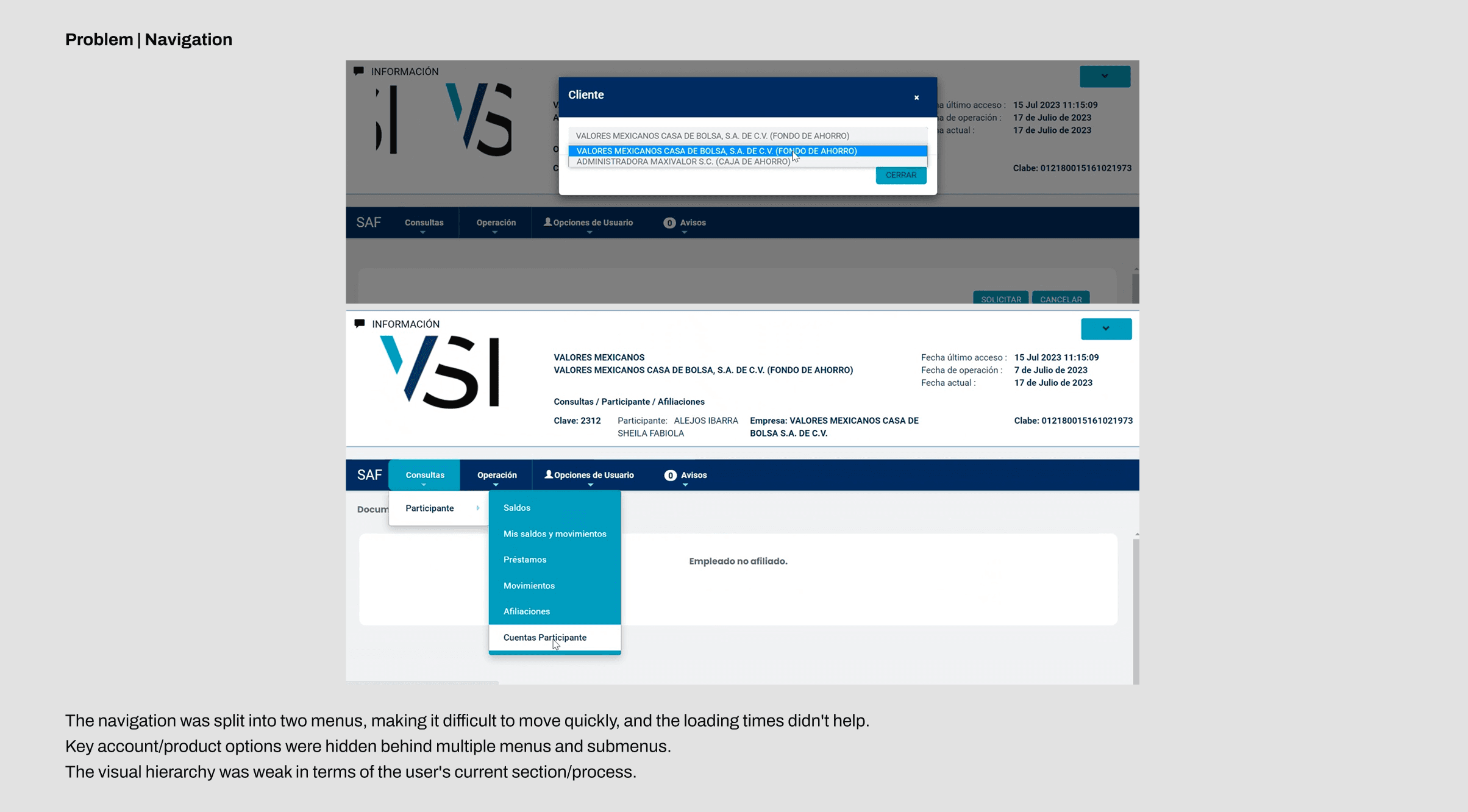
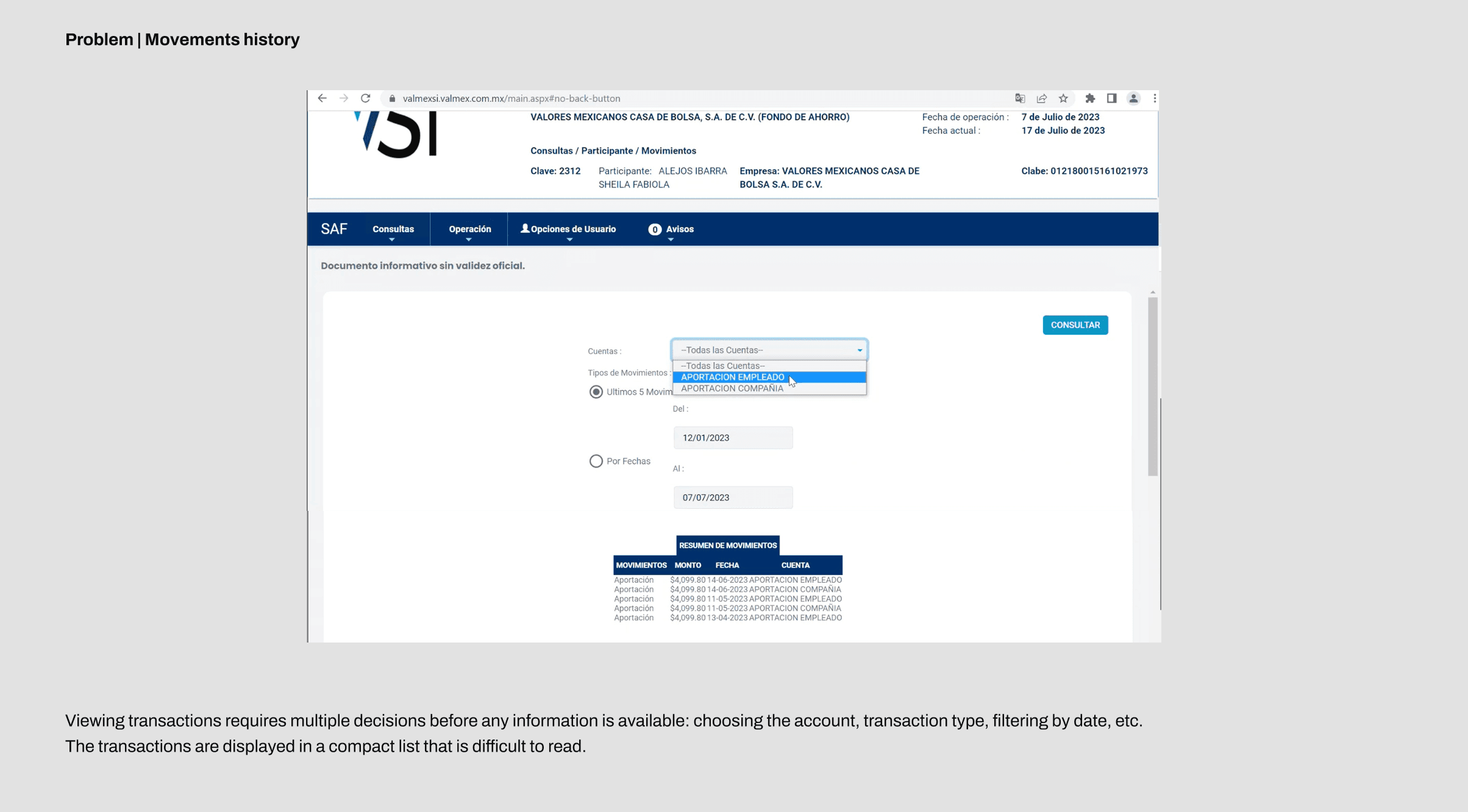
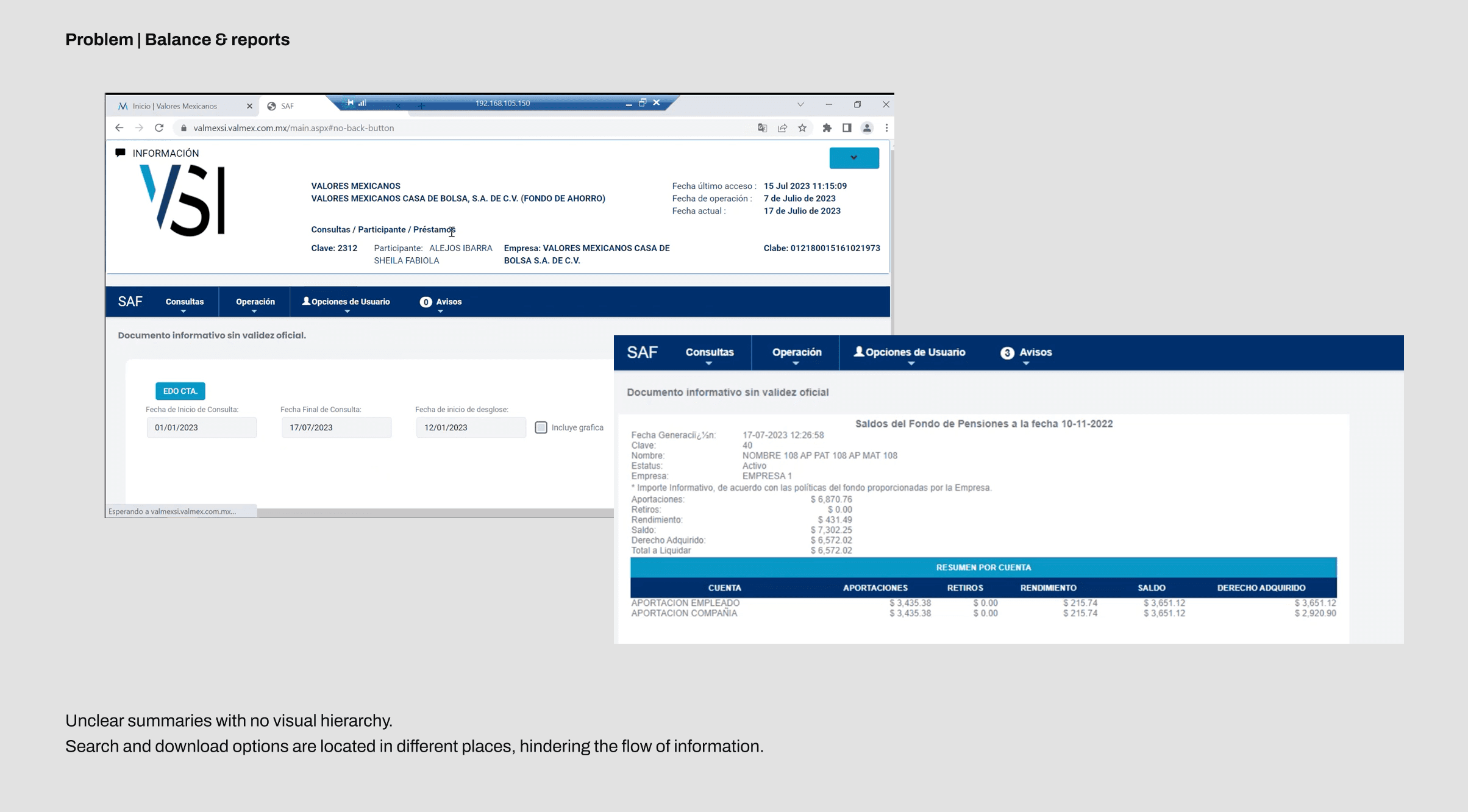
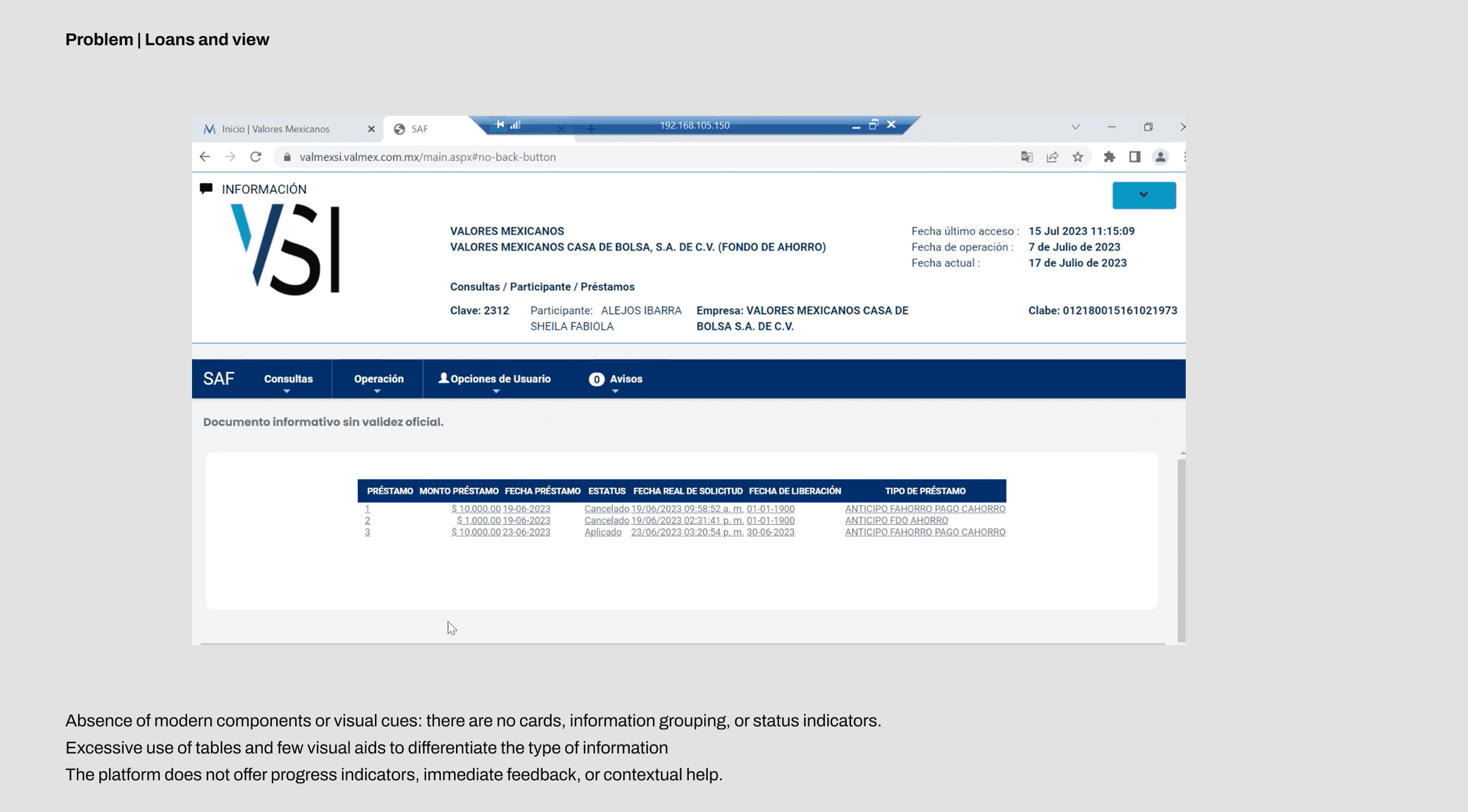
To better understand the current situation of Valmex, stakeholders shared their viewpoints and experiences using the platform. The reality was that they did not fully understand how to use it or find all the functionalities, constantly interrupting the processes they were sharing. This was due not only to its visually confusing design but also to the user experience, which seemed to make completing a task feel impossible. In summary, a disastrous platform where poor performance was the worst of the problems. Below, I share some of the most notable issues along with the pain points shared by the stakeholders.
Long story short, a disastrous platform where poor performance was the least of the problems. Below, I share some of the most notable issues along with the weaknesses identified by stakeholders.
Define
Then we focus in what matter
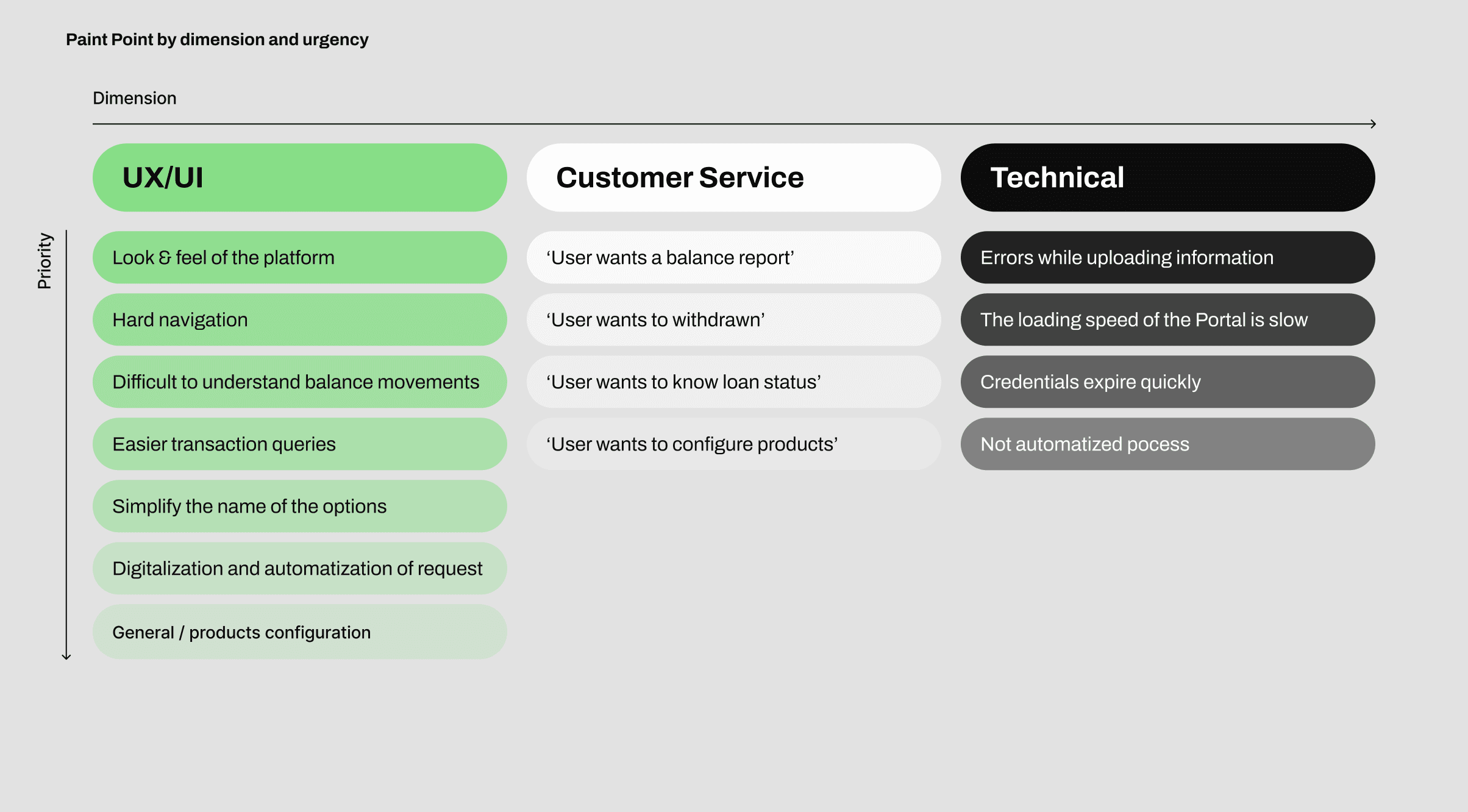
Once the problems became evident, we decided which ones we could realistically tackle within the limited time. We established three dimensions—UX/UI, Customer Service, and Technical—and categorized each issue based on urgency and critical impact. This ensured that even if time ran out, we would still address the main stakeholder pain points.
However, it became clear that the technical issues could not be solved within the workshop. Our focus was transforming the UX pain points into functional and intuitive views, and converting the Customer Service needs into digitalized flows that users could access directly from the platform.
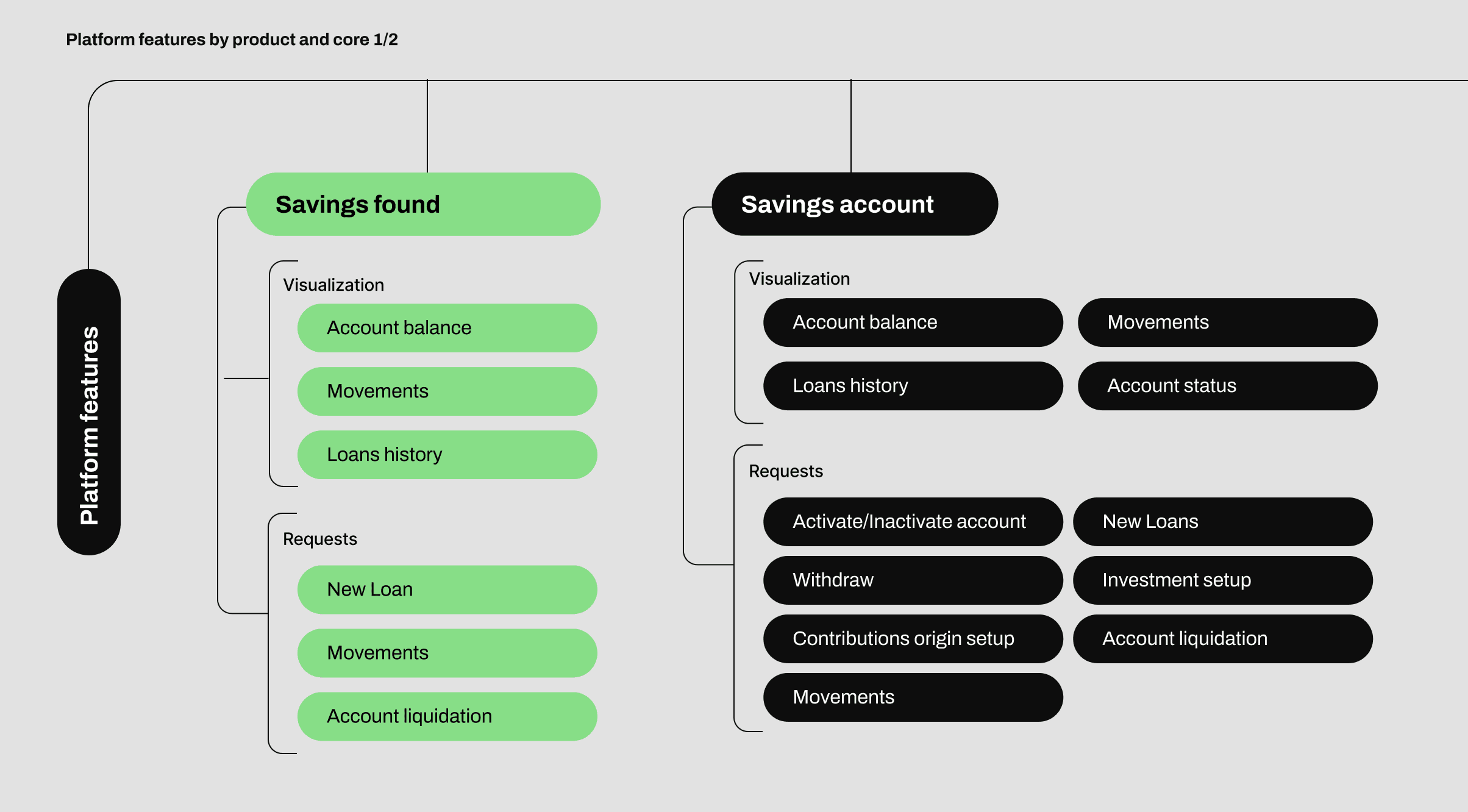
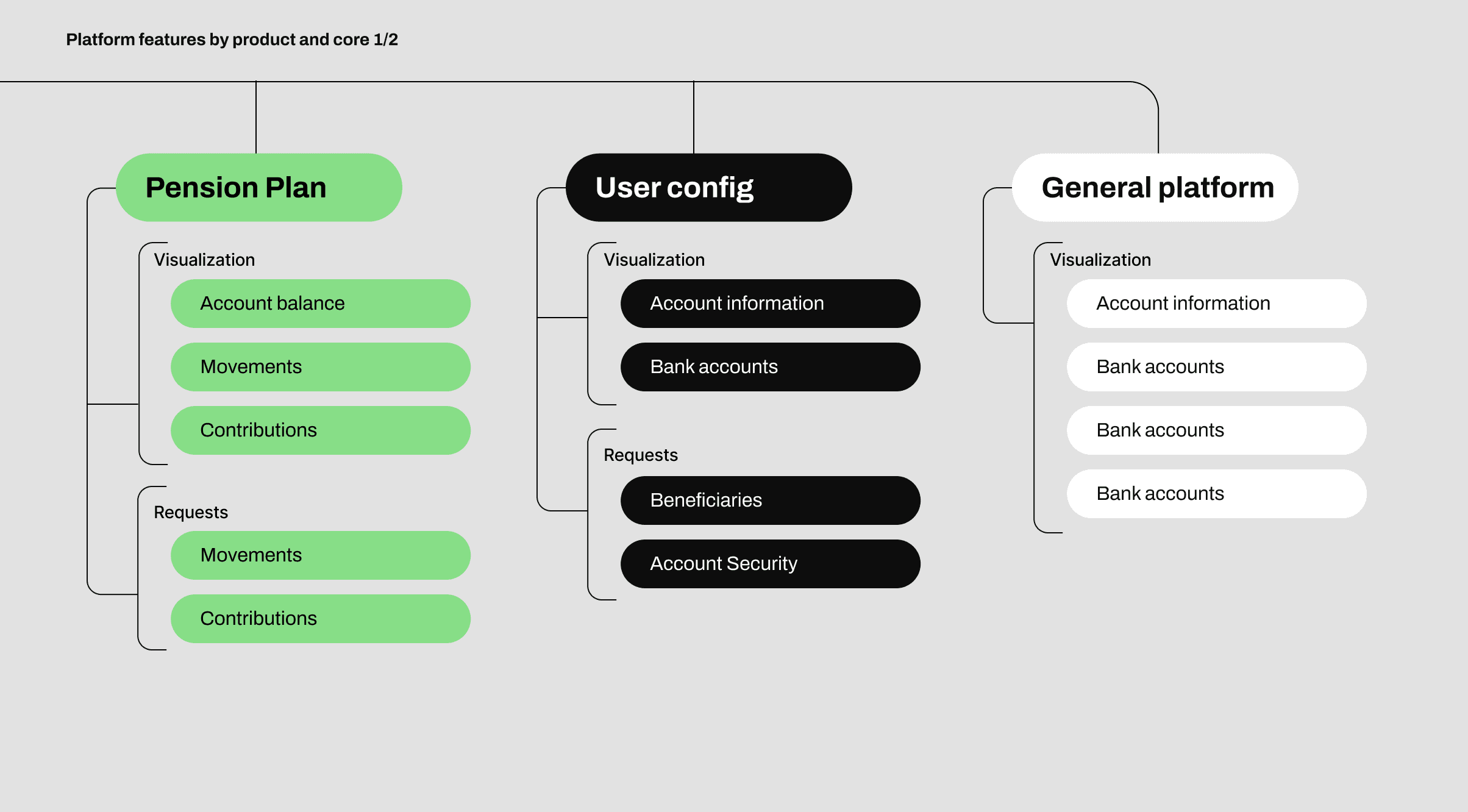
Then we created a quick map of the platform organized by product/service and its core functionalities. This allowed us to visualize the ideal structure and identify which experiences needed to be redesigned first.
Design
Building a lean, scalable design system
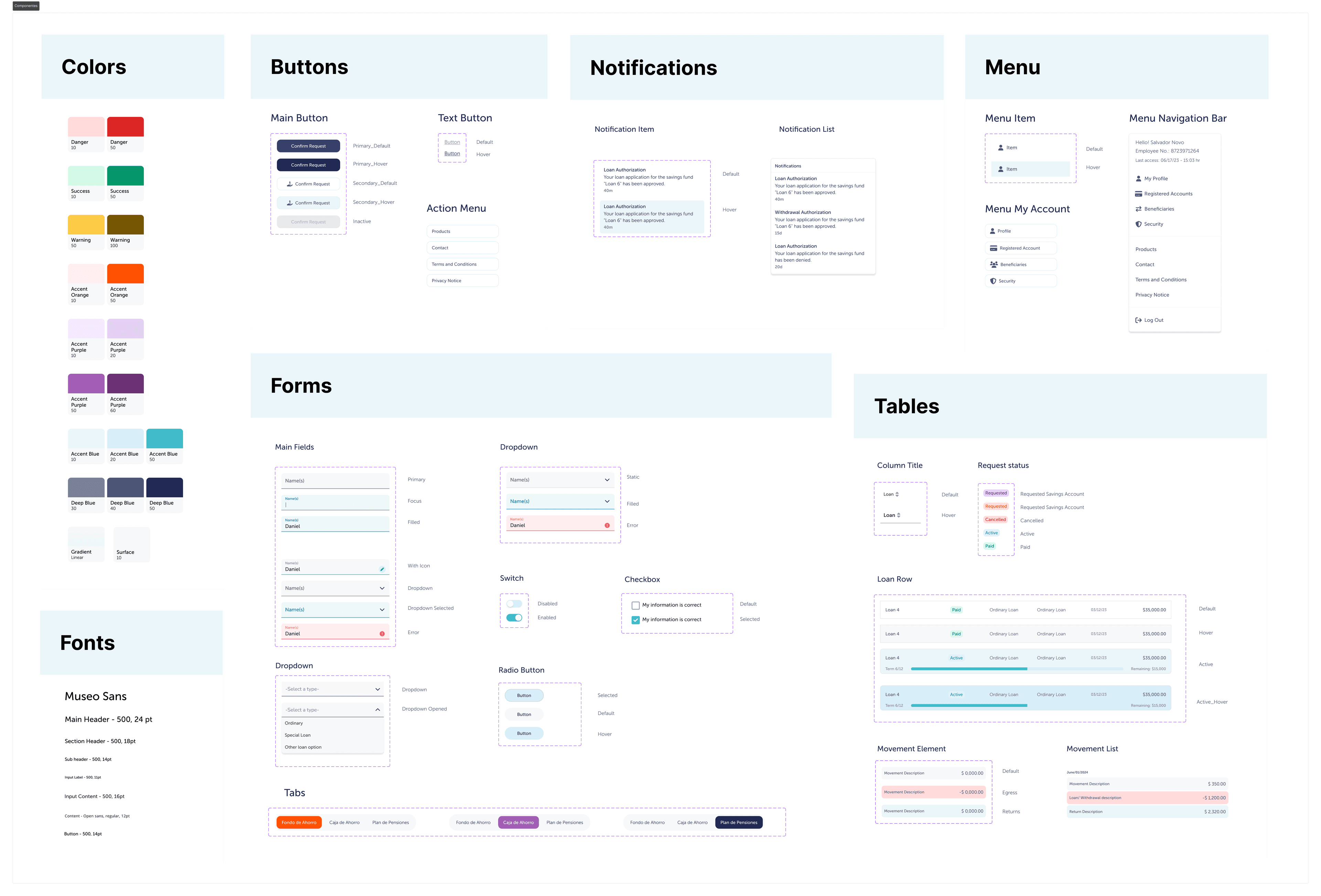
I established a new visual direction using brand colors as foundation, avoiding endless mood board debates. Then benchmarked financial platforms (why reinvent proven patterns?) and grew the system organically as new flows revealed new needs.
What i delivered
10+ reusable components
covering 80% of interface needs, buttons in all states, form inputs with validation, navigation, cards, modals, tables, and status badges. Not exhaustive, but enough to build most screens without starting from scratch.
Design tokens in Figma
Color palette, typography scale (6 styles), 4px spacing grid, and shadow hierarchy.
Organized for developers
Components page with all variants, flow documentation with annotations. Everything needed to start building immediately.
Modern Navigation
I start by split the accounts in a more visual way by receiving the user in a “home” section where he get a clear view of his active products and current total balance for each. Then he can decide which review using the cards or the new navigation bar.
I implemented a common navigation bar with 5 sections, this way move between accounts (Savings fund, Savings account and Pension Plan) is easier and not confusing with the clear indicator of the current product the user is visiting.
Lastly i reserve the platform and account settings in the user menu and a quick button to view relevant updates.
I didn't reinvent the wheel but brought the platfomr back to the modern era.
Refreshing account view
The old balance view was neither easy nor quick to read, as complex tables and technical language made it difficult to understand. For this new version, i designed a clearer visual hierarchy and improved accessibility through the strategic use of color-coded transaction types, a monthly balance chart for recent months, and a card-based structure that organizes information into easy-to-scan and distinguish sections.
Product actions
Continuing with the new navigation structure between products, i implemented an actions sidebar for each one. This way, users can instantly see the available actions per account without hidden menus sub-options or exit the view.using the same visual style for all actions ensured accessibility and user interaction.
After this visual changes, quick reviewing account balances and know which actions can be perform on the account are instantly.
Visible Loans and withdrawals
A new loan view was designed from scratch, focusing on quick and easy scanning, while maintaining the same user experience as the balance view. A side panel was also implemented for viewing more detailed loan data, keeping the experience within a single view for user convenience and a clear interface.
With this redesign identify loans an know their status are know an easy task
Querying transactions history
For this redesign, the focus was in simplify the interaction, using concise filter options to speed querying time and improving the balance report generated in the query, specifying the balance thought the query configuration and including the feature of download the generated report.
With this new version consult the transaction history is easier and straightforward.
Digitalizing request
For this pain point i keep it simple, turning common request of withdraws and new loans into custom forms split in steps, ensuring user know how long is the process and displaying key information base on how the user configure his request, simplifying process and options for the experience.
Now the user can request anything he wants at his own pace and with his own experience.
Easier Product configuration
With this last pain point, i had to accelerate the design process because it was tackled in the final days of the sprint, so i made it as straightforward and efficient as possible. I decided to use inline forms; by doing this, i only had to adapt our design pattern to a view where the forms were persistent and required minimal clicks to edit.
The real challenge was how to communicate the availability of the changes and whether they had been implemented. this concerns was solved by creating an inline notifications below the forms to confirm or reject actions, instead of a full confirmation screen. i land a collection of views where the action come natural for the user at the same time he understand the parameters is setting up without the help of customer service
Account settings
Lastly, since this specific options are not planed to be changed constantly weren't included in the product action panel, instead ,were wrapped up the account configurations in a control panel accessible from the top bar in the user menu. This last decision gave us opportunity to include the configurations in the stablished time, leading to deliver a 100% new version of the current platform without omissions
Validation
Daily validation with stakeholders
We didn't save designs for one dramatic final reveal. Instead, we presented new flows daily while stakeholders tested the prototype in real-time. By day 10, every core flow had been tested by 5 stakeholders across 3 departments, iterated 2-3 times, and approved for development.
100% stakeholder confidence
that redesigned flows solved identified pain points, not "it's fine" agreement, genuine excitement.
Self-service completion
Stakeholders completed tasks like loan requests and transaction queries without assistance, unlike the old platform where even employees needed help.
Development-ready deliverables
Prototype + component library + annotated flows = everything needed to start building.
What we skipped (strategically)
We didn't test with end users during the sprint. With thousands of users across diverse companies, proper research would need 3-4 additional weeks. Instead, we leveraged stakeholders institutional knowledge, especially Irving from CRM, who handles frustrated users daily.
Our recommendation to Valmex: Test with 10-15 actual customers across different company sizes before full development to validate assumptions and catch edge cases.
Try it your self
Post Delivery Impact
From prototype to production
Valmex's development team committed to full implementation based on our delivered prototype, design system, and documentation.
Visit live log-In
While you can see some changes made over our initial design since we weren't involved in the build phase and don't have post-launch analytics, their decision to greenlit development validates our approach. Companies don't commit resources to designs they're not confident in.
What this mean?
- Rapid validation gave leadership confidence to invest
- Component library was sufficient for independent implementation
- Scoped approach aligned with their resources and timeline
Metrics i'd track (if i could): Customer service ticket reduction (target: 40-50%), task completion rates, time-on-task for core actions, and user satisfaction scores. But hey, that's consulting sometimes, you ship and trust it works.
Recap and learning
Different areas have different concerns
Stakeholders from marketing, customer experience, and operations didn't always agree on priorities. Marketing wanted modern branding, CX wanted fewer support calls, Operations needed technical feasibility. This created tension that occasionally derailed our neat Design Sprint methodology. As facilitators, we played diplomat, balancing viewpoints in real-time. Did this slow us down? Yes. Was it valuable? Absolutely. Each team felt heard, and compromises—what ships now vs. later—were conscious decisions everyone agreed on. The result addressed essential concerns while giving us a foundation for future iterations.
Workshop efficiency
These types of design exercises tend to be intense and somewhat burdensome for the design team. They require a lot of concentration, quick decision-making, and the ability to adapt on the fly. It's not easy. However, what you gain in return is well worth the effort. During this exercise, I could see how it not only involved the design team but also actively engaged the stakeholders. With everyone figuratively at the same table, questions could be resolved, expectations aligned, and key decisions made on the spot, without the friction that traditional processes sometimes create, where validations and iterations often come with a it's ok
or I don't like it
from the stakeholders. Beyond the immediate results, these types of dynamics have added value: they make design more accessible and understandable for non-technical profiles. Stakeholders feel part of the process, better understand the why
behind each decision, and this helps design ideas to be validated faster and with more confidence. In this sense, UX design stops being an add-on
and becomes a strategic, visible, and valued tool within the project and for the stakeholders.
Working under pressure made me a better designer
Constraints breed clarity. Having just 10 days forced me to prioritize ruthlessly (does this solve a high impact pain point?), communicate faster (articulate rationale in 2 minutes, not 20), design for implementation reality, and let go of perfection (good enough to validate
beats perfect but gathering dust
). These skills are invaluable for startup environments where shipping something good next week beats shipping something perfect next quarter. I'd take this scrappy approach over a 6-month theoretical project any day.